Contact center automation in 2026 is more than adding a chatbot. It is a full operating model change: self-service that works, agent assist that reduces after-call work, and operations automation that makes QA and routing scalable. This guide covers the trends that matter, why they matter, and a practical roadmap you can execute. It also explains why open-source voice agents (and self-hosting) are a real advantage for serious teams.
dograh oss

This guide is written from the viewpoint of building real voice automation, not repeating vendor brochures. Most teams win when they treat automation as systems + workflows + governance, not a bot. In 2026, the biggest shift is multi-agent voice setups that mirror how real contact centers work.

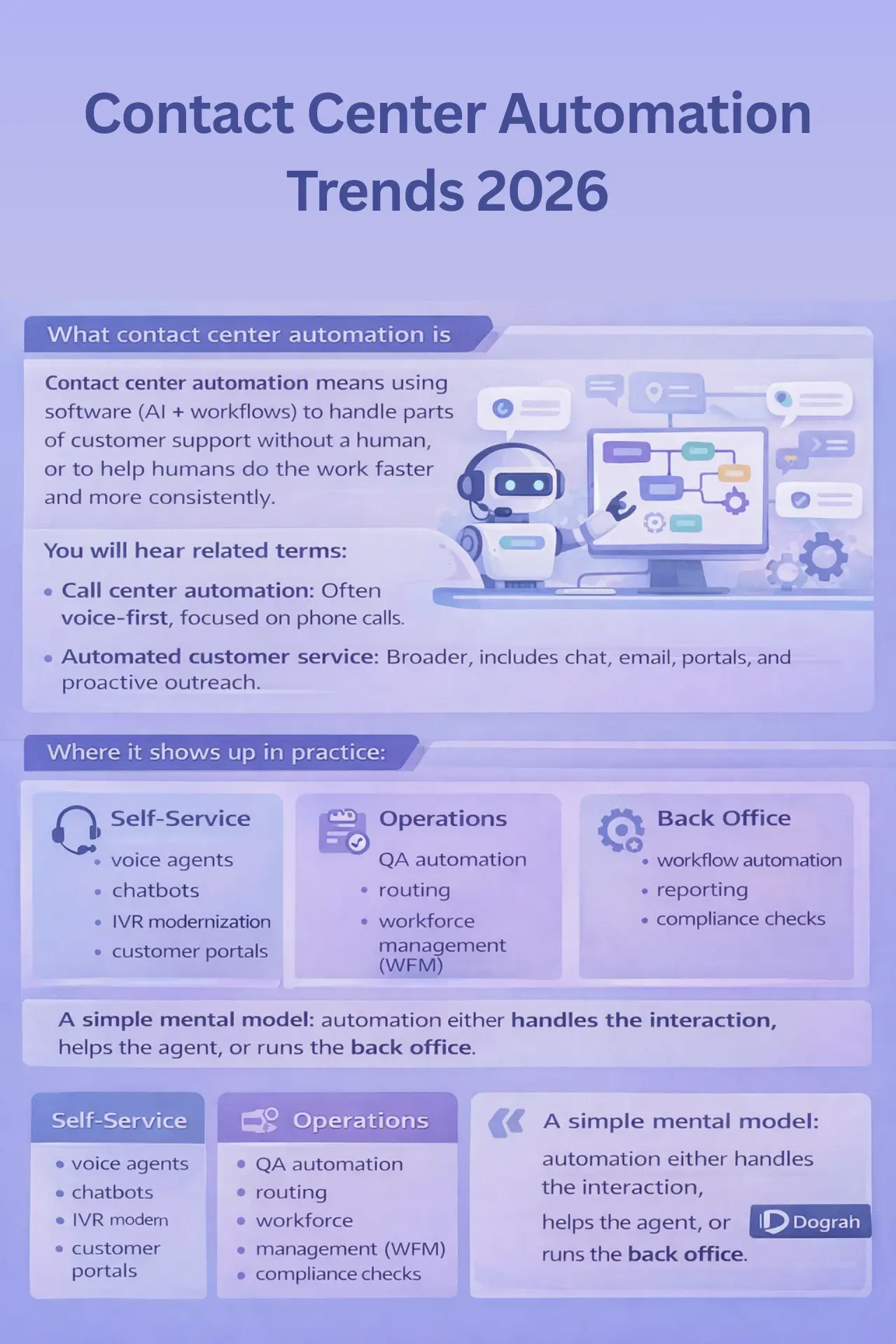
What contact center automation is (simple definition)

Contact center automation means using software (AI + workflows) to handle parts of customer support without a human, or to help humans do the work faster and more consistently.

You will hear related terms:

  • Call center automation: Often voice-first, focused on phone calls.
  • Automated customer service: Broader, includes chat, email, portals, and proactive outreach.

Where it shows up in practice:

  • Self-service: voice agents, chatbots, IVR modernization, customer portals.
  • Agent assist: live summaries, suggested replies, knowledge search, next-best actions.
  • Operations: QA automation, routing, workforce management (WFM), compliance checks, analytics.

A simple mental model: automation either handles the interaction, helps the agent, or runs the back office.

Why it matters now: better CX, lower cost, faster service

Contact centers are under pressure from both sides: customers want instant service, and businesses need cost control.

Two data points frame the market reality:

In day-to-day operations, the "why now" is measured in KPIs:

  • AHT (Average Handle Time): reduce talk time + after-call work.
  • FCR (First Contact Resolution): fewer repeat contacts when intent is captured correctly.
  • CSAT: improves when containment is high and escalation is smooth.
  • Cost per contact: lower when routine work is automated and QA is not fully manual.
  • Containment rate: the percentage of contacts resolved without human takeover.

From my own experiments with AI receptionists for call routing and scheduling, the biggest wins are faster response times and fewer missed calls. The systems work best when latency is low and the script adapts to natural speech. The hard part is keeping tone and empathy consistent in messy real conversations.

What's different in 2026: from single bots to multi-agent voice systems

In 2026, serious contact center automation is moving from one bot that does everything to multiple specialized agents working together.

This mirrors how contact centers already operate:

  • Frontline handles routine requests.
  • Escalation agents handle exceptions and policy edge cases.
  • Expert agents (or humans) close sales, negotiate payments, or resolve complex disputes.

Multi-agent voice automation also makes compliance and quality easier. You can keep strict flows where needed, and still allow flexibility where it is safe.

It also explains why open source + self-hosting is gaining traction:

  • Price control for high-volume minutes.
  • Better governance over prompts, logs, and PII boundaries.
  • Ability to bring your own telephony and AI providers (BYOK).
  • Reduced lock-in when you need to change models or vendors.
Dograh Slack Link

Myths about contact center automation (that break projects)

Bad assumptions are why automation fails, even when the technology is good. These three myths appear in almost every failed rollout. Fix them early, and your roadmap becomes much simpler.

Myth 1: "One bot can handle everything"

A single agent tends to become a giant prompt with unclear policies. It either hallucinates, loops, or escalates too late. Multi-agent orchestration is usually safer and easier to maintain.

Myth 2: "Automation always lowers CSAT"

CSAT drops when callers feel trapped or forced to repeat themselves. CSAT can improve when containment is high and handoffs are warm and fast. A good transfer with a conversation brief often matters more than perfect automation.

Myth 3: "You must move data to the cloud"

Many teams can automate while keeping sensitive data on-prem or in their own VPC. Open-source, self-hostable platforms make this realistic for more teams. You still need security controls, but architecture is not a blocker by default.

Future of Work: 4x4x4x4 Model for Human-AI Collaboration | Prabakaran Murugaiah posted on the topic | LinkedIn
My future of work framing: the 4 x 4 x 4 x 4 idea When I look at where this is going, I use a simple mental model: 4 days a week 4 hours a day 4 shifts a day $4 an hour (Expected ai assistant cost) The future looks like this: Human workforce at $40/hour, supported by an AI assistant that costs about $4/hour. This is not a promise and not a pricing sheet. It’s a direction. The core idea is that AI co-workers will work faster, cover more hours (cover multiple shifts), and lower the cost of routine operations. As a result, businesses will redesign their workflows around this new reality. I recently had an insightful conversation with Pritesh Kumar on the future of AI transformation at work and across the workforce. Below are the top 10 insights. The full blog link is in the comments. Top 10 Insights on the Future of Work & Workforce 1. Work is shifting from roles to outcomes. 2. Copilots are transitional; autonomous AI workers are the end state. 3. AI replaces tasks, not entire roles. 4. Managers will become orchestrators of humans and AI. 5. Productivity will be measured by decision velocity. 6. Skills adjacency will matter more than deep specialization. 7. 24x7 digital labor + Human Assistance will redefine availability. 8. Organizations will flatten as coordination work disappears. 9. Competitive advantage will come from AI adoption speed. 10. AI will become a formal workforce category. Maayu AI and Maayu Government Solutions are deploying #DigitalHumans as autonomous #AIworkers that deliver outcomes, not just assistance. These #AIcoworkers operate 24×7, can read, write, speak, listen, and see simultaneously, and provide personalized, one-to-one support at scale across recruiting and workforce programs. Led by Michael T. , Maayu Government Solutions deploys AI Digital Human Coaches to support veterans, transitioning service members, and unemployed workers with personalized, one-to-one guidance at scale, available 24×7, without requiring a computer or smartphone.

Top contact center automation trends for 2026 (10-12 trends + how to start)

These trends are the ones you can act on, not vague predictions. Each trend includes where it fits (self-service, agent assist, ops), how to start, and what can go wrong. If you only pick two trends for 2026, start with voice agents and QA automation.

Trend 1-4: AI call center agents + multi-agent voice orchestration (frontline > escalation > expert)

Multi-agent voice is the most practical agentic pattern for contact centers. It reduces hallucination risk, improves handoffs, and matches real staffing tiers. It can work for inbound and outbound flows.

Trend 1: Frontline AI call center agent for routine intents

A frontline voice agent handles the first 30-90 seconds well: intent capture, identity checks, and simple tasks.

Problem it solves

  • High volume of simple contacts that do not need a person.
  • Long queues for status check calls.

Where it fits

  • Self-service (primary)
  • Operations (structured data capture)

How to start

  1. Pick 5-10 intents with clear resolution rules (hours, booking, order status, address update).
  2. Define escalation triggers (low confidence, angry caller, policy keyword).
  3. Connect to your systems via webhooks (CRM, ticketing, order APIs).
  4. Measure containment and transfer reasons weekly.

Key risks

  • Hallucination when it answers from memory instead of approved sources.
  • Broken integrations (timeouts, wrong customer record).
  • Caller distrust if the voice feels unnatural or latency is high.

Trend 2: Escalation voice agent for policy exceptions and edge paths

An escalation agent is a second-stage voice agent with tighter rules, better tools, and stricter compliance constraints.

Problem it solves

  • Edge-case handling without flooding humans.
  • Safer policy enforcement (refund rules, billing disputes, eligibility).

Where it fits

  • Self-service and operations

How to start

  1. Create a separate escalation persona with narrower permissions.
  2. Give it explicit policies and allowed actions only.
  3. Require a conversation brief from frontline before it speaks.

Key risks

  • Transfer loops if escalation rules are unclear.
  • Frustration if caller repeats details (fix with brief).

Trend 3: Expert agent (or human) for high-value closure

It can be a specialist bot or a human agent, depending on risk and complexity.

Problem it solves

  • Sales conversion, retention saves, debt negotiation, complex troubleshooting.

Where it fits

  • Self-service (partial) + human operations

How to start

  1. Start with a human expert but improve the handoff experience first.
  2. Then add expert automation for narrow high-value workflows.

Key risks

  • Compliance failures in regulated scripts.
  • Over-automation of emotionally sensitive cases.

Trend 4: Warm handoffs + conversation briefs as a core feature (not optional)

Most automation projects fail at the handoff. A warm transfer is where CSAT is won or lost.

Problem it solves

  • Customers repeating themselves.
  • Agents starting blind and asking the same questions.

Where it fits

  • Self-service + agent assist

How to start

  1. Define a standard conversation brief schema.
  2. Log it to CRM/ticketing before transferring.
  3. Display the brief instantly to the agent or next bot.

Key risks

  • Passing unverified info as facts.
  • Missing consent language when call recording is active.

Debt collection example (multi-agent voice) A realistic setup I have seen work well:

1. Reminder bot (frontline)

  • Confirms identity (light verification).
  • Provides payment reminder and options.

Escalation trigger

  • User asks about interest, disputes amount, requests hardship plan, or shows frustration.
  • Or the model confidence drops below threshold.

Warm transfer to expert bot or human

  • The system passes a conversation brief: what was offered, what the user said, verified fields, and the next recommended action.
  • Then the expert bot/human takes over.

This approach matches actual L1/L2/L3 contact center structure instead of fighting it.

Trend 5-7: GenAI for agent assist, knowledge automation, and case wrap-up

Agent assist is usually the safest way to use GenAI first. It reduces after-call work and improves consistency without fully automating the customer interaction. It also creates the dataset you need for voice automation later.

Trend 5: Live call summaries and real-time note-taking

Live summaries reduce cognitive load and improve documentation.

Where it fits

  • Agent assist

How to start

  1. Start with post-call summaries, then move to real-time.
  2. Store summaries as drafts until the agent approves.

What to log

  • Summary text + key facts extracted (account ID, intent, resolution, promises made).
  • Confidence flags (what was inferred vs explicitly said).

Risk control

  • Require approved sources for claims.
  • Mark unverified items clearly.

Trend 6: Knowledge automation (search + grounded answers)

Agents waste time searching wikis and outdated SOPs. GenAI can help, but only if it is grounded.

Where it fits

  • Agent assist

How to start

  1. Build a curated knowledge base: approved articles only.
  2. Use retrieval-based answers and cite the source internally.
  3. Block responses when no source exists ("I cannot find that policy").

Trend 7: Automated disposition + after-call work reduction

After-call work is expensive and inconsistent. Automating disposition also improves reporting quality.

Where it fits

  • Agent assist + operations

How to start

  1. Generate suggested disposition, tags, and follow-ups.
  2. Have the agent confirm in one click.
  3. Push structured fields to CRM/ticketing.

How to evaluate accuracy

  • Sample 50-100 calls weekly.
  • Track:

    1. Disposition accuracy

    2. Tag precision/recall

    3. Wrong follow-up created rate

How to avoid wrong answers

  • Ground responses using approved sources.
  • Separate free text summary from structured commitments.
  • Put hard rules around payments, cancellations, and compliance language.

Trend 8-10: Speech + sentiment analytics, QA automation, and coaching (sales training assistant)

Automated QA is one of the highest ROI trends because it scales instantly. It turns "we reviewed 2% of calls" into "we reviewed 100% for key risks". It also powers targeted coaching, not generic feedback.

Trend 8: Speech analytics for compliance and intent insights

Speech analytics extracts what happened in calls, not what agents typed later.

What to measure

  • Intent distribution (top call drivers)
  • Silence time and interruptions
  • Escalation reasons
  • Repeat contacts by intent

Outputs that teams actually use

  • Trend dashboards
  • Call highlights (moments that caused drop-offs)
  • Risk flags (missing disclosures)

Trend 9: Automated QA scorecards (script adherence + empathy + compliance)

Manual QA does not scale. Automation can pre-score every call and route only borderline cases to humans.

What to measure

  • Script adherence (required phrases present)
  • Compliance phrases (disclosures, consent)
  • Empathy markers (acknowledgement language)
  • Policy adherence (no forbidden claims)

Outputs

  • Scorecards per call
  • Agent weekly coaching summary
  • A top 5 misses report per team

Trend 10: Coaching copilots and sales training assistants

Coaching often fails because it is too slow and too subjective. A coaching assistant can find patterns across many calls.

How it helps

  • Highlights what top performers do differently
  • Suggests talk tracks for objections
  • Flags where agents rush, interrupt, or miss discovery questions

Mini case study (example template you can copy) Use this structure internally:

  • Baseline:

    1. AHT: 8:10

    2. QA coverage: 3%

    3. CSAT: 4.1/5

  • After 6 weeks:

    1. QA coverage: 100% for compliance phrases

    2. AHT: -8% (less after-call work)

    3. CSAT: +0.2 points (fewer repeat questions on escalations)

  • What changed:

    1. Real-time summaries + automated QA highlights

    2. Weekly coaching based on top 3 misses

If you implement this, capture your own numbers from week 0 so you can prove ROI later.

Trend 11-12: Smart routing, WFM automation, and omni-channel journey continuity

Routing and WFM are boring until they are broken. Then they become the reason CSAT drops and costs spike. In 2026, the winners connect intent + effort prediction + context continuity.

Trend 11: Skills + intent + predicted-effort routing

Not all calls should be treated equally. Some are fast, some are emotionally charged, and some require expertise.

How to start

  • Add intent detection early (IVR, voice agent, or first 20 seconds classification).
  • Route by:

    1. Skills (billing, tech, retention)

    2. Intent (refund, dispute, cancellation)

    3. Predicted effort (likely handle time, complexity, sentiment)

Common failure

  • Intent classification exists, but the CRM and telephony routing tables are not aligned.
  • The customer gets bounced across queues.

Trend 12: Omni-channel continuity + WFM automation

Customers switch channels. Your context should not reset.

First integration to do

  • Connect CRM + ticketing + CCaaS so context flows across voice/chat/email.

Where teams fail

  • Siloed tools: chat history not visible to phone agents.
  • Ticket fields not standardized, so automation cannot trigger actions.
  • Workforce forecasting ignores automation containment changes.

Glossary (key terms)

Where automation breaks in real life: integrations, telephony scale, compliance, and cost

Most failures are not model failures. They are systems failures: old CRMs, messy data, brittle telephony, and unclear compliance rules. Treat this section as a pre-mortem for your rollout.

Integration reality check: CRM, old systems, custom telephony, internal APIs

Integrations are the hidden cost center of contact center automation. Older pre-existing systems are a top failure point, especially when teams try to bolt on automation. And the data backs up the pain: 63% of CRM implementations overrun budgets due to unforeseen telephony sync complexities, often delaying rollout by 3-6 months.

Common integration points you will need:

  • CRM (customer profile, status, interaction history)
  • Ticketing (case creation, updates, SLAs)
  • Payments (PCI scope, tokenization, payment links)
  • Order status / delivery tracking
  • KYC / identity verification
  • Internal status check APIs (account balance, eligibility)
  • Webhooks to trigger workflows (follow-ups, emails, SMS)

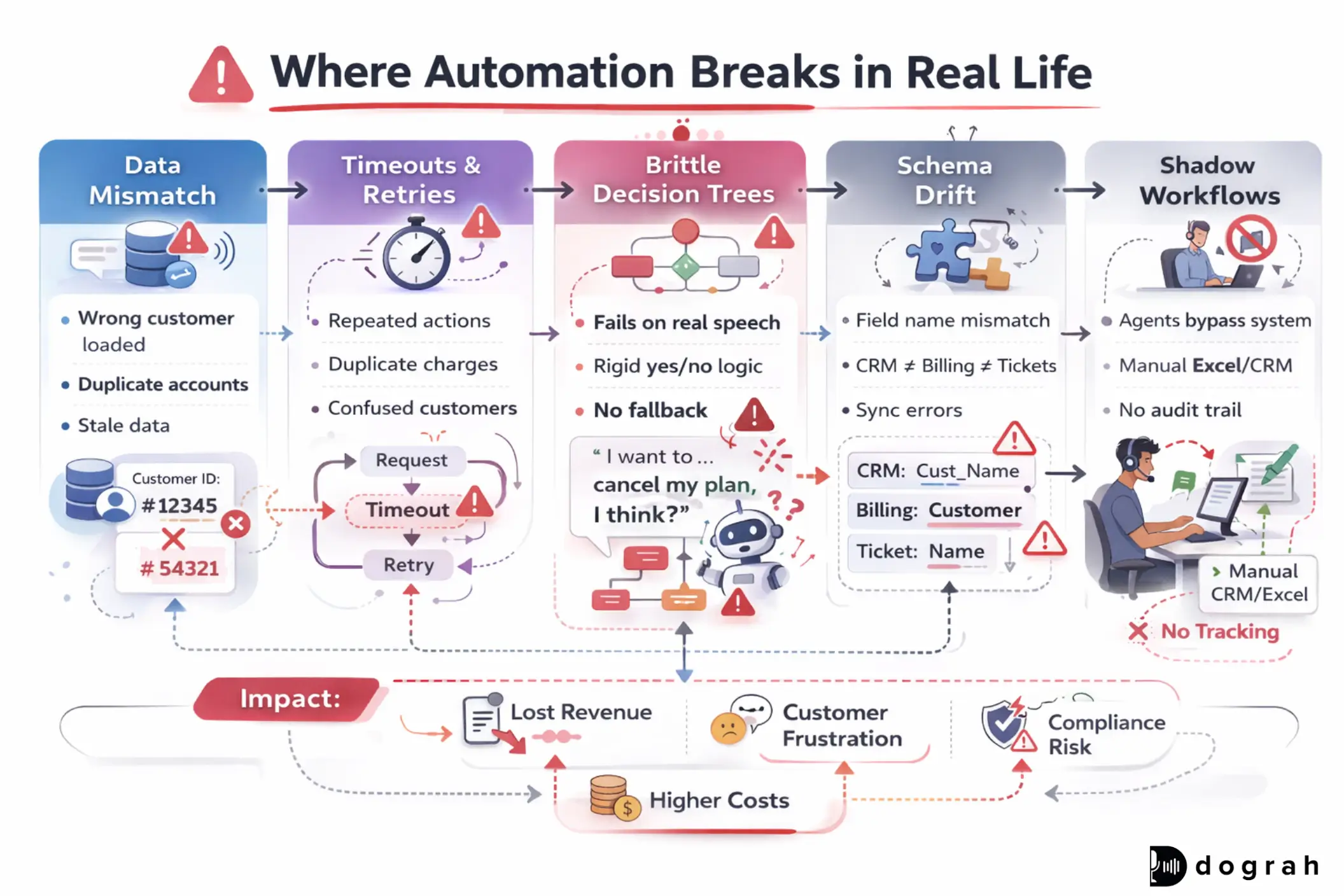
Typical breakages to expect:

  • Data mismatch (wrong customer loaded, duplicate accounts)
  • Timeouts and retries causing repeated actions
  • Brittle decision tree flows that do not handle real speech
  • Inconsistent field naming across tools
  • Shadow processes where agents bypass the system

A useful warning sign: surveys show 20-70% of CRM projects fail overall, and poor integrations are cited as a blocker in 17% of cases alongside data silos.

Compliance + PII: call recording, redaction, and data access rules

Compliance is not a checklist you add at the end. In contact centers, it affects recording, retention, model training, and even what can be displayed to agents.

Two major realities:

  • GDPR mandates explicit consent for call recording and data processing, with fines up to EUR 20 million or 4% of global turnover. Recent enforcement trends show stricter penalties when transcripts and personal data are mishandled.
  • PCI DSS 4.0 requires encryption and access controls for payment data. One report notes 77% of security leaders planned adoption by 2025, while audit failure rates hover around ~30% due to unredacted recordings exposing card details. Fines can average $50,000-$500,000 per incident.

Step-by-step mitigation checklist (practical)

1. Map PII fields

  • Name, phone, email, address, ID numbers, payment data, health data.

2. Minimize data

  • Collect only what you need to complete the task.
  • Do not store raw audio/transcripts longer than required.

3. Consent controls

  • Explicit consent prompts for recording where required.
  • Record consent events in logs.

4. Role-based access

  • Limit who can see transcripts, recordings, and exports.
  • Separate agent view vs QA view vs admin view.

5. Encryption

  • Encrypt recordings and transcripts at rest and in transit.
  • Use tokenization for payment flows.

6. Redaction

  • Redact card numbers, CVV, bank details from audio and transcripts.
  • Block AI from reading back sensitive strings.

7. Audit logs

  • Track who accessed what, when, and why.
  • Keep immutable logs for investigations.

8. Vendor and model review

  • Know where data goes (STT, TTS, LLM providers).
  • Prefer BYOK where possible for control.

9. Incident response

  • Define breach workflows and timelines.
  • Prepare for strict breach notification windows.

Voice quality: accents, tone, multilingual needs, and user trust

Voice automation fails quickly when the caller thinks "this is not for me". Trust is built through tone, clarity, and cultural fit.

Real-world issues you must plan for:

  • Accent mismatch (especially in regional languages)
  • Tone mismatch (too cheerful for complaints, too robotic for sales)
  • Multilingual switching (caller changes language mid-call)
  • Background noise and poor phone lines

This matters even more in low-cost geographies where contact centers are common, and where customers may be more sensitive to outsourced voice signals. Matching tonality and accent is not cosmetic. It is conversion and CSAT.

Price-competitive automation: build vs buy, usage costs, and open source value

Cost is not just licensing. It is usage. Cost drivers that surprise teams:

  • Telephony minutes
  • STT (speech-to-text) cost
  • TTS (text-to-speech) cost
  • LLM tokens (especially long calls)
  • Human fallback (escalation staffing)
  • QA review time (if automation is not trusted)
  • Rework cost when integrations break

This is why contact centers in India, South Asia, and Africa often demand price control. They operate on thin margins and high volume.

Open source and self-hosting can help:

  • Reduce vendor lock-in.
  • Enable bring-your-own-keys so you can optimize STT/TTS/LLM costs.
  • Allow local deployments for latency and privacy.

CTA Image

Vapi vs Open Source Voice Agents: Which to Choose?

Discover Vapi vs Open-Source voice agents like Dograh, Pipecat, LiveKit, and Vocode to decide the best option for cost, control, and scale.

Vapi vs Open Source

Maturity model (Level 1-4): from basic IVR to agentic contact centers

A maturity model helps you avoid big-bang failures. Most teams should move up step by step, not jump ahead. Each level has clear KPIs and clear signs of what not to automate yet.

Level 1: Basic automation (routing + simple FAQ)

This level is about stabilizing the basics first. You modernize IVR, improve routing, and remove the most repetitive questions. It is the fastest path to early wins.

Baseline capabilities

  • Intent capture (basic menu or simple classifier)
  • Better queue routing and callback
  • FAQ automation via portal/chat for top questions

Typical KPIs

  • Reduced abandons
  • Slight containment lift
  • Better routing accuracy

What not to automate yet

  • Payments and disputes without compliance controls
  • High-emotion complaints without escalation readiness

Quick wins

  • Add a self-service portal for simple issues (aligns with the 61% self-service preference trend Salesforce).
  • Use automation to collect reason-for-call before an agent answers.

Level 2: Assisted agents (summaries, knowledge, QA sampling)

This level makes human agents faster and more consistent. It also produces cleaner structured data for later automation. In practice, it reduces after-call work first.

What changes

  • Summaries and disposition suggestions
  • Knowledge search grounded in approved sources
  • QA sampling with automated pre-scoring

Minimum data needs

  • Call recordings/transcripts (with consent rules)
  • A small set of labeled intents and dispositions
  • A curated knowledge base

Evaluation basics

  • Accuracy on disposition fields
  • Hallucination rate in suggested answers
  • Agent adoption rate (do they accept suggestions?)

Level 3: Multi-agent voice automation (frontline + escalation + expert)

This is where agentic becomes real. You run specialized voice agents with strict handoff rules. Inbound and outbound both become viable.

Core requirements

  • Handoff rules (confidence, compliance, sentiment)
  • Warm transfer with a conversation brief
  • Human fallback that is fast and reliable

Outbound + inbound

  • Outbound reminders (collections, renewals) work well at this level.
  • Inbound triage and appointment booking also works well.

This matches what I have seen: AI can handle routine calls, routing, and summaries, so humans focus on complex or emotionally sensitive cases. Success depends on seamless handoffs and clear escalation rules.

Level 4: Fully instrumented automation (evals, observability, governance)

This level is about reliability and continuous improvement. You do not launch and hope. You monitor, test, and iterate. This is what keeps automation working after the first month.

Always-on monitoring

  • Latency and drop rates
  • Transfer loops
  • Hallucination spikes
  • Escalation reasons trending up

What to log

  • Intent, confidence, sentiment markers
  • Tool calls (which APIs were hit, results, timeouts)
  • Policy hits (blocked actions, compliance warnings)
  • Conversation brief content and outcomes

How to spot failures early

  • Drop-offs after a specific prompt
  • Rising transfer rate for a single intent
  • Repeated "I did not understand" patterns
  • Negative sentiment spikes tied to a voice choice

Execution matters more than trend spotting. This section is designed so an ops leader and an engineer can use it together.

Prerequisites (before you automate voice at scale)

You can prototype without these, but you cannot scale safely. Most teams underestimate this list and pay later. If you do only one thing, standardize your data fields.

Prerequisites:

  • A clear top-10 intent list from recent call data
  • A basic knowledge base with approved policies
  • CRM and ticketing field standards (names, types, ownership)
  • Call recording consent flow and retention rules
  • A defined escalation path (who takes over, within what SLA)

Free checklist: data readiness, security, integrations, KPI targets

Use this like a downloadable checklist for your internal kickoff. If you cannot check most boxes, start with Level 1-2 first. This reduces rework and compliance risk.

Data readiness


Security + PII


Integrations


KPI targets (set numbers before building)


Tool category map (not a vendor roundup)

You need a stack view, not a list of logos. Most failures are missing categories, not missing features. Keep your stack modular so you can swap components.

Categories:

  • Telephony/CCaaS: call control, transfers, recording events
  • STT: speech-to-text
  • TTS: text-to-speech
  • LLM: reasoning + generation
  • Orchestration: multi-agent flows, tools, handoff rules
  • RPA/workflow: backend task automation
  • CRM/ticketing: system of record
  • Analytics/QA: scorecards, highlights, compliance checks
  • WFM: forecasting, scheduling, staffing
  • Monitoring/evals: latency, failure modes, test harnesses

How to measure success: dashboards and experiments

If you cannot measure it weekly, you cannot improve it. Most teams track too few metrics early, then argue from opinions. Build a dashboard before you scale.

Track weekly:

  • AHT (talk time + after-call work)
  • Containment rate
  • Transfer rate + reasons
  • Escalation loop rate
  • QA scores and compliance flags
  • CSAT and complaint rate
  • Opt-out rate (callers refusing automation)
  • Latency and drop rates

Run simple A/B tests:

  • Prompt changes for clarification questions
  • Routing rules (intent confidence threshold)
  • Voice selection (tone/accent)
  • Escalation thresholds based on sentiment markers
CTA Image

Synthflow vs Open Source Voice Agents: Which to Choose ?

Explore Synthflow vs Open-Source voice agents like Dograh, Pipecat, LiveKit, and Vocode to find the best option for cost, control, and scalability.

Synthflow vs Open Source

Open-source voice platforms are no longer side projects. They are becoming a way to control cost, privacy, and iteration speed. They fit directly into the multi-agent trend shaping 2026.

Why open source is a trend enabler: self-host, control, and less lock-in

Open source matters for three reasons:

  • Data boundaries: you can self-host to keep transcripts and call logs within your environment.
  • Auditability: you can inspect the logic that routes, stores, and redacts data.
  • Cost control: you can bring your own telephony and AI providers (BYOK) and optimize per geography.

This matters in regulated environments (GDPR/PCI scope) and in cost-sensitive markets where per-minute pricing can destroy margins.

A practical signal that open-source voice tooling is maturing is community traction:

  1. The Dograh repository has 17,000+ GitHub stars, showing strong adoption for a self-hostable voice agent platform.
  2. LiveKit core server has ~16.8k stars, reflecting widespread use in real-time audio infrastructure.
  3. Pipecat has ~9,600 stars, and pipecat-ai/smart-turn has ~1,200 stars, showing momentum in real-time voice agent components .
  4. vocode-core has ~3.7k stars, another indicator of active developer ecosystems for voice agents.

Dograh is positioned as a privacy-focused, self-hostable alternative to closed platforms. It emphasizes:

  • No-code drag-and-drop builder for real-time conversational AI
  • Multilingual agents (30+ languages)
  • BYOK integrations for STT/TTS/LLM
  • AI-to-AI testing (Looptalk)
  • Low-latency calls (reported under ~600ms in community claims)

If you want to evaluate it, start with the Dograh website and then inspect the Dograh open-source repository for deployment and architecture details.

Reference setup: multi-agent voice system with clear handoffs

A good reference architecture is simple and strict. It separates responsibilities, limits permissions, and makes handoffs explicit. That is how you reduce hallucination and improve CSAT.

Architecture (high level)

  • Frontline Voice Agent

    Role: greet, identify intent, collect minimum info, handle routine tasks.

  • Escalation Voice Agent

    Role: handle exceptions, policy edge cases, mild negotiation, more tools.

  • Expert Agent or Human

    Role: complex resolution, sensitive cases, high-value close.

You can run the real-time layer using open infrastructure like LiveKit and agent components through systems like Pipecat, depending on your stack. Dograh can sit at the orchestration layer with its visual workflow builder and multi-agent workflows, while keeping integrations modular via webhooks.

Exact handoff rules (example you can copy)

Frontline -> Escalation Trigger when any of these happen:

  • Intent confidence < 0.75
  • Caller repeats the same question twice
  • Negative sentiment markers (anger/frustration words)
  • Compliance trigger phrase appears (refund dispute, legal threats, chargeback)
  • Payment flow requested but verification incomplete

Escalation -> Expert bot/human Trigger when:

  • The caller asks for a hardship plan, settlement, exception approval
  • The caller is payment ready and amount is above threshold
  • Caller threatens churn/cancel with high LTV signals
  • The case involves regulated disclosures requiring human confirmation
  • Escalation agent detects repeated objections (loop risk)

What goes into the conversation brief (minimum viable packet)

Pass this as structured fields, not only text:

  • Customer intent (top 1-3)
  • Summary of what happened so far (3-5 bullets)
  • Verified fields (name, account last-4, order ID)
  • Unverified claims (clearly labeled)
  • Tools already used (APIs called + results)
  • Sentiment flag (neutral/negative) and key trigger phrase
  • Next recommended action + why
  • Compliance status (consent captured? recording notice given?)

Adoption tips for real teams: start small, keep humans in the loop

Adoption is mostly change management, not technology. Teams trust automation when it is predictable and easy to override. These tips reduce rollout risk.

Practical tips:

  • Start with low-risk intents first (status checks, scheduling, FAQs).
  • Make escalation easy and fast. Do not trap callers.
  • Train agents on AI summaries:

    1. what to trust

    2. what to verify

    3. how to correct quickly

  • Roll out multilingual support gradually:

    1. start with 1-2 languages

    2. add accent/voice variants only after QA

  • For low-cost geographies, optimize for:

    1. per-minute cost control (BYOK)

    2. reliable telephony integrations

    3. low-latency audio and stable transfers

  • Expect workforce impact:

    1. routine calls will shrink first

    2. specialists become more important, not less

My view: AI will keep replacing first-level call center work because most businesses will automate routine tasks as soon as the economics work. Many basic calls can already be handled, especially detail collection, routing, and common questions. The teams that win will design the human roles that remain: escalation, empathy, and complex resolution.

I had an insightful conversation with the Dograh (Open source voice AI platform) team about the real gaps that still exist in voice AI, and it got me thinking about where we are versus where we think… | Stephanie Nyarko PMP, CSPO, ACP | 43 comments
I had an insightful conversation with the Dograh (Open source voice AI platform) team about the real gaps that still exist in voice AI, and it got me thinking about where we are versus where we think we are. After over a year of building voice agents, here’s what’s clear: ✅ AI alone doesn’t solve the problem, reliability comes from workflow design, tight scope, and deterministic logic, not just large models. ✅ Many voice AI demos sound great, but fail in production because they lack hard rules and clear escalation paths. ✅ Voice tech still struggles with global language & accent diversity, especially outside widely supported Western languages. ✅ Self-hosting matters, not only for cost and privacy, but for adaptability and long-term control of your stack. The biggest takeaway? Focus on the workflow first, then let AI play its role. Good voice agents solve a defined business problem, execute a specific set of tasks well, and know when to hand over to a human. If you’re building voice AI, start with the problem, lock the scope, and design for reliability. Success isn’t in how smart the bot sounds it’s in how well it works. Link to full article is in the comments section. | 43 comments on LinkedIn

Closing note (and where Dograh fits)

In 2026, contact center automation is shifting toward multi-agent voice systems, stronger QA automation, and better routing with context continuity. The winners will treat integrations, compliance, and observability as first-class work.

Dograh is built for teams that want to move fast without surrendering control:

  • Visual, drag-and-drop workflows
  • Multi-agent orchestration patterns
  • BYOK for STT/TTS/LLM and telephony
  • Cloud or self-host deployment options
  • Early AI-to-AI testing via Looptalk

My recommendation is to avoid a platform that forces you into a single model, a single telephony provider, or opaque logs. If Dograh gives you the control you need, use it. If it does not, pick a more modular stack and keep ownership of your data and routing logic.

If you want to experiment, start small: one use case, one integration, tight escalation rules. Then scale with testing and governance. You can explore Dograh through the Dograh website and inspect the code in the Dograh open-source repository.

Related Blog

FAQ's

1. What is AI-to-AI voice testing (Looptalk-style stress testing) ?

AI-to-AI voice testing uses simulated AI callers to repeatedly call a voice agent, stress-testing real behaviors (latency, compliance, handoffs) at scale. Dograh’s Looptalk applies this to multi-persona, regression-style testing where failures usually appear between agents, not at hello.

2. What are the trends for contact center automation ?

Contact center automation in 2026 shifts to an operating model: multi-agent voice systems for L1/L2 handling, real-time agent assist, and automated QA/compliance. Open-source, self-hosted voice agents are rising as teams demand control, lower costs, and deeper integrations.

3. Which automation is trending now ?

Right now, the biggest trend is end-to-end AI voice agents for contact centers, especially open-source, self-hosted systems using multiple agents (frontline, escalation, expert). Teams favor platforms like Dograh AI for control, lower costs at scale, and tight integration with real business workflows.

4. How can we improve customer experience ?

To improve customer experience, a practical path is deploying an open-source, self-hosted voice agent stack (for example Dograh with LiveKit or Pipecat) that supports multi-step workflows and reliable handoffs.

5. How do multi-agent voice systems work in a contact center ?

Multi-agent voice systems split a call into a frontline ai agent for call center handles greeting, identity checks, intent capture, and routine requests.

Was this article helpful?