Voice AI for customer support is no longer a "nice demo". In 2026, it is a practical way to cut hold time, resolve repetitive issues, and keep support open 24/7.
Teams buy it because it plugs into the systems they already run (CRM, helpdesk, billing), and it improves measurable outcomes like resolution rate and CSAT (Customer Satisfaction Score).
I have built and tested voice agents for real support flows, and the biggest lesson is simple: accuracy and integrations beat "fancy voice" almost every time. This is also why Reddit threads discuss “the systems that handle interruptions well, integrate cleanly with calendars/CRMs, and don’t sound overly scripted matter more than flashy demos.”
What voice AI for customer support is (and why teams buy it in 2026)
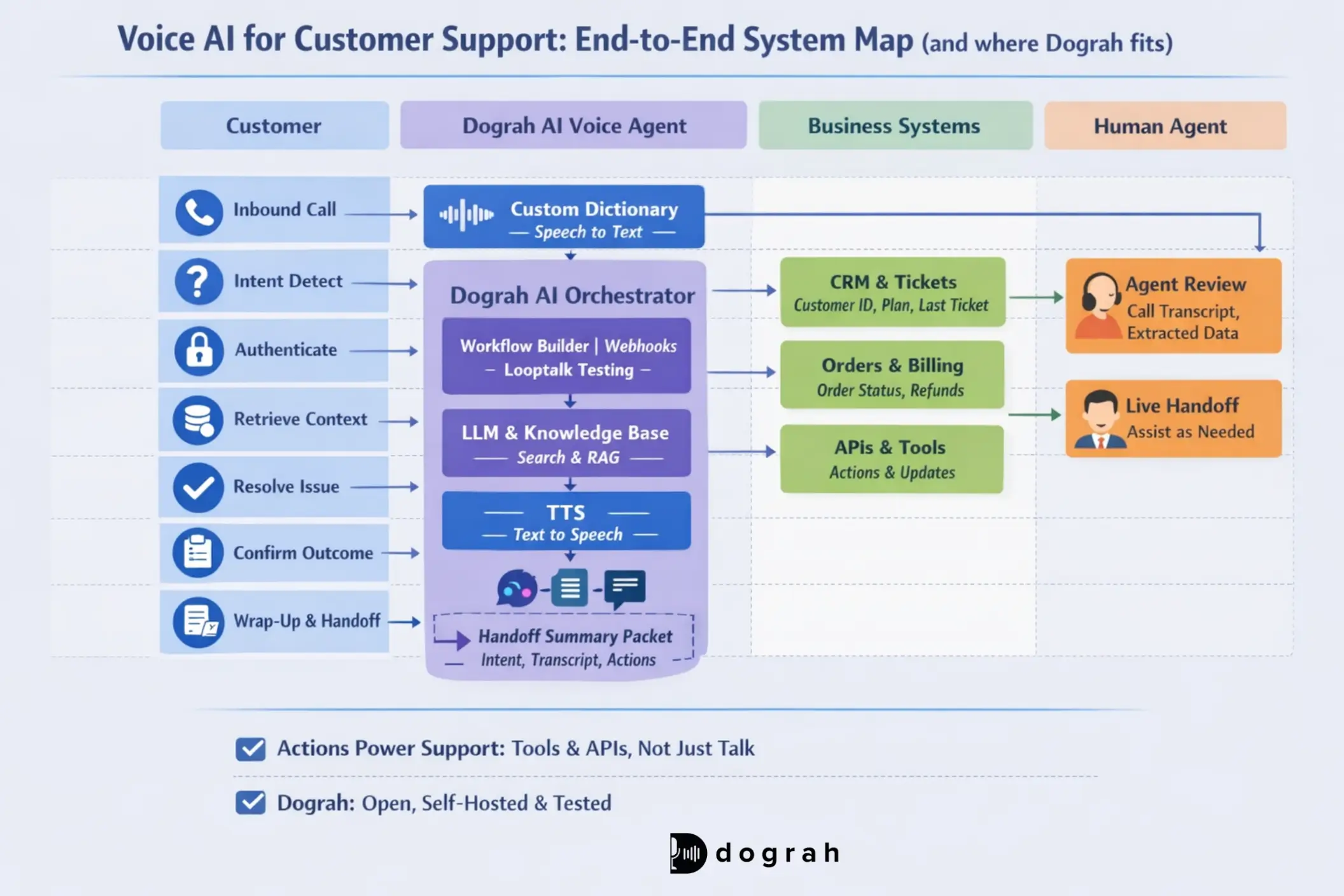
It is a phone agent that talks naturally, takes actions in your backend, and escalates cleanly when needed.
One-sentence definition + the main benefit
Voice AI for customer support is a phone-based conversational agent that can resolve issues, route calls, and take real actions (like payment links, password resets, appointment changes) using human-like speech.
The main benefit is faster resolution at lower cost, with 24/7 coverage.
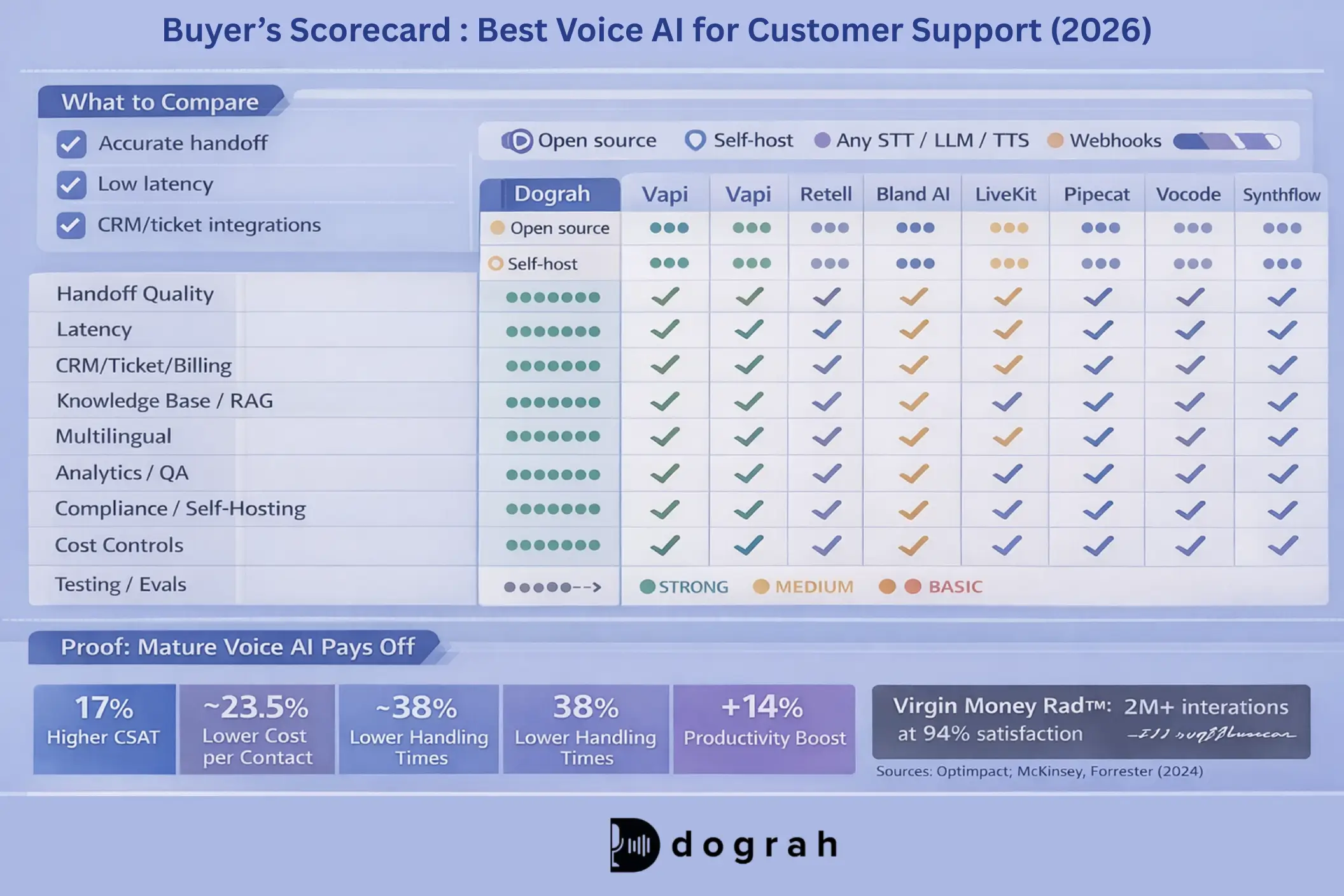
This shows up in outcomes. IBM reports that mature AI adopters see 17% higher customer satisfaction when operating or optimizing AI-powered customer service solutions.
Above the fold: 3 buyer benefits + CTA
You buy voice AI to get measurable wins fast:
- Reduce wait time: fewer calls queueing, especially after-hours
- Deflect repetitive calls: handle the "same 10 questions" automatically
- Improve consistency and CSAT: fewer wrong answers across shifts and geos
If you want maximum control and the option to self-host, I start with Dograh. You can build, test, and iterate quickly without committing to a single vendor stack.
Why customer support is the #1 voice AI use case
Customer support fits voice AI better than almost any other department.
- First, 60%-80% of calls tend to be repetitive and predictable for a given business. That means you can start with a small set of intents and still deflect meaningful volume.
- Second, success is easy to measure. You already track resolution rate, repeat contact rate, average handle time, and CSAT.
- Third, your team already has structure. SOPs, scripts, decision trees, and even IVRs exist today. Voice AI upgrades that automation rather than forcing a reinvention.
- Fourth, customers accept bots when the bot removes pain. When there is no hold time and the answer is correct, adoption follows.
There is also strong momentum across the industry. Gartner reported that by 2025, 80% of companies will have adopted or plan to adopt AI-powered chatbots for customer service operations. In 2026, voice is following the same curve, but the integration bar is higher.

Glossary (key terms)
- STT keyword dictionaries (custom business vocabulary): A list of domain terms you want speech-to-text to recognize correctly (like product names, acronyms, medical terms, or policy phrases).
- Barge-in: When the caller interrupts the agent mid-sentence, and the agent stops speaking and listens immediately.
- Shadow mode rollout: A pilot mode where the AI listens and produces outputs, but does not take customer-facing actions yet.
- Handoff summary (context-rich escalation note): A structured summary the AI sends to a human agent during transfer so the customer does not repeat themselves.
What to look for in an AI voice agent for customer support
A good ai voice agent checklist prevents expensive rework.
Core features buyers expect (natural talk, fast replies, barge-in, handoff)
These are the features that matter in real calls:
- Low latency responses: fewer awkward pauses and fewer hangups
- Natural multi-turn dialog: more than intent + single answer
- Barge-in: callers can interrupt without breaking the flow
- Intent handling + recovery: can change topics and come back
- Human escalation with a summary: clean transfer that reduces AHT
- Multilingual support: especially 30+ languages if your queue spans regions
One Reddit user phrased it well: the systems that survive production are the ones that handle interruptions and do not sound scripted.
Dograh ships with multilingual support (30+ languages by default), supports language switching mid-call, and can be configured to support more languages by swapping STT providers.
Integrations that make it actually solve tickets
Buyers commonly look for integrations with:
- Helpdesk: Zendesk (tickets, macros, SLAs), Freshdesk, ServiceNow
- CRM: Salesforce (account context, entitlements), HubSpot
- CCaaS / Contact center: Genesys, Amazon Connect, Five9
- Telephony/SIP: bring-your-own SIP, or programmable voice
- Notifications: SMS, WhatsApp, email for confirmations and links
- Core systems: OMS, billing, subscriptions, IAM/auth
For streaming audio into your own AI stack, tools like Twilio Voice + Media Streams are widely used because they support real-time bi-directional audio over WebSockets.
Knowledge base quality
A voice agent works well only when it has clear, accurate, and up-to-date information. If the knowledge is missing or wrong, the agent will also give poor answers, no matter how smart the AI is.
A good knowledge base is not one long document. It is:
- Atomic FAQs: one question, one clear answer, one policy link
- Procedures/SOPs: step-by-step, with "if this then that"
- Decision trees: routing rules and exception handling
- Policy rules: returns windows, fees, compliance scripts
- Tribal knowledge capture: "what senior agents do" written down
In my experience, the top failure mode is not model choice. It is stale or scattered knowledge.
Dograh supports knowledge-base access (RAG) and structured workflows, so you can keep policy answers separate from tool execution steps.
Trust, safety, and control
Support calls contain sensitive data. You need controls, not just prompts.
A practical trust guardrails:
- PII handling: redaction in logs, least-privilege access
- Encryption: in transit and at rest
- Retention controls: configurable call recordings and transcripts
- Audit logs: who accessed what and when
- Data residency: keep data in-region when required
- Hallucination reduction: constrained tools and decision flows
Self-hosting help when residency, regulated environments, or one-less-hop architecture matters. Dograh is open source and self-hostable, which makes compliance architecture easier for teams.
Real use cases: what voice AI can handle in a call center
Start with common, repetitive requests where the outcome is clear and easy to define.
High-volume repeat intents (where 60%-80% of calls often live)
These are common call reasons voice AI can handle well:
- Order status and delivery ETA
- Returns, refunds, and exchange policy questions
- Password reset and account unlock
- Balance and status checks
- Address change and profile updates
- Appointment scheduling, rescheduling, cancellation
- Basic troubleshooting ("restart device", "check connection")
- Store hours, location, and policy FAQs
- Subscription pause/cancel (with confirmation steps)
Inbound support is often the easiest win. That also matches operator feedback shared in public discussions Reddit thread on what works in production.
Example flow #1: Order status + delivery issue (with exact integrations and handoff summary)
This is a classic high volume, low complexity workflow.
1) Greeting + intent capture
- Caller: "Where is my order? It says delivered but I do not have it."
- Agent: confirms intent (order status + delivery issue).
2) Customer verification (lightweight)
Verify using one or two fields:
- phone number match
- last name + zip code
- last 4 digits of order phone/email (depending on policy)
3) Tool calls (integrations)
- CRM: pull customer profile + recent tickets
- fields: customer_id, name, phone, tier, last_ticket_ids
- OMS (order management system): find order
- fields: order_id, items, ship_address, carrier, delivery_eta
- Carrier API: tracking + proof of delivery
- fields: tracking_id, tracking_status, delivery_timestamp, pod_url
- Helpdesk (Zendesk/Salesforce Service/ServiceNow): create ticket if needed
- fields: ticket_id, category=delivery_issue, priority, notes
- SMS/WhatsApp/Email: send tracking or claim link
- fields: message_template_id, tracking_link, claim_form_link
4) Resolution actions
Based on policy:
- If "in transit": share ETA, send tracking link by SMS
- If "delivered today": ask caller to check building/mailroom, wait 24 hours
- If "delivered 2+ days ago": create a delivery claim ticket
- Offer options: reship, refund, escalation depending on eligibility
5) Human handoff (only when needed)
If the customer is angry, a policy exception is needed, or data is missing, transfer with context.
Handoff summary format (copy/paste ready)
- Intent: Order status + "delivered not received"
- Verification: phone match + last name + zip confirmed
- Order: order_id=_____, carrier=, status=, delivered_at=_____
- Actions taken: sent tracking link via SMS, created ticket ticket_id=_____
- Next step: human to approve exception/reship/refund per policy
- Sentiment: calm / frustrated / angry + reason
Dograh works well here because you can build this as a structured workflow (decision-tree style) and still use an LLM for natural dialog. You can also extract variables like order_id and ticket_id and trigger webhooks.
Example flow #2: Password reset + MFA help (with data fields and guardrails)
This is another high-volume intent, but the user also needs to be careful with stricter guardrails.
1) Identify issue
- Caller: "I cannot log in. MFA is not working."
- Agent: splits it into (a) password reset and (b) MFA (Multi Factor Authentication) recovery.
2) Identity checks (policy-based)
Examples:
- confirmed phone number on file
- date of birth (if allowed)
- last 2 digits of a known identifier (never full values)
3) Tool calls (integrations)
- IAM/Auth system (Custom auth):
- fields: user_id, account_status, lockout_reason, reset_token_created=true/false
- CRM notes:
- fields: customer_id, security_flags, last_login_time
- Helpdesk ticket update:
- fields: ticket_id, category=login_help, resolution_code
- Email/SMS:
- fields: reset_link, delivery_channel, template_id
4) Guardrails (non-negotiable)
- Never read full MFA codes aloud
- Confirm only partial values (example: last 2 digits)
- Rate-limit attempts (per phone number and per account)
- Escalate if risk signals appear (account takeover suspicion, repeated failures, mismatched identity)
5) Resolution or escalation
- If reset succeeds: confirm next step ("Set a new password, then re-enroll MFA")
- If MFA device lost: trigger approved recovery path
- If risk flagged: transfer to human security queue with a summary
Dograh's structured workflow approach is useful here because it reduces hallucinations. The agent follows a decision tree and only uses tools that are allowed for that step.
When to route to humans (clear rules) vs keep automated
Route to humans when:
- Low confidence in intent or entity extraction
- Policy exceptions (refund beyond window, special approvals)
- Strong negative sentiment or threats
- Complex billing disputes
- Missing data from core systems
- Compliance flags (identity mismatch, risk indicators)
Keep automated when:
- Data is available and policy is clear
- Customer goal is simple and repeatable
- The action is reversible and logged
- The system can confirm completion (ticket closed, reset triggered)
The key is handoff with context. Done right, escalations reduce handle time instead of increasing it.
Best voice AI for customer support (2026): top tools + who each is best for
Pick a solution that matches your team’s abilities and compliance needs, instead of chasing hype or trends.
Quick comparison table (pricing model, telephony, integrations, self-hosting, security)
Note: verify current security posture, retention settings, and enterprise features during evaluation.
Platform tools vs open-source/self-hosted stacks (what to choose)
This choice usually comes down to whether you value faster setup or greater control.
Managed platforms fit when:
- You need to launch fast
- You have standard needs
- You accept vendor lock-in risk
- You do not need deep residency controls
Open-source/self-hosted fits when:
- You need stronger compliance and data residency controls
- You want BYO telephony, STT, LLM, and TTS
- You need deep customization and predictable costs
- You want to avoid renting your stack long-term
Dograh fits in the open-source. It is designed to get you started quickly, then scale into a controlled, auditable system.
IBM also reports operational upside from AI beyond automation. For example, 70% of customer service managers use generative AI to analyze customer sentiment across multiple customers, and 66% use it for personalization when optimizing AI. Treat these as phase-2 wins after basic automation is stable.
What is a STT keyword dictionary
An STT keyword dictionary is a list of business-specific words and phrases you want the speech-to-text system to recognize with higher accuracy.
It helps when your domain has acronyms, product SKUs, drug names, or internal terms that general-purpose STT models often mishear. In healthcare, terms like OPD and HbA1c matter. In banking, KYC matters. In ecommerce, product names and carrier terms matter.
When it beats model switching:
- When your errors cluster around a finite list of terms
- When the rest of your transcription quality is already good
- When you want to improve accuracy without migrating providers
- When you need fast iteration (add words weekly based on transcripts)
Dograh supports adding business-specific keywords so transcription keeps the intended terms (for example, "BP high" stays "BP high" instead of being rewritten).
Monitoring and analytics (transcripts, QA scoring, sentiment, dashboards)
A basic analytics setup should include:
- Transcripts + recordings (with redaction where needed)
- Intent distribution: what customers actually call about
- Containment/deflection rate: % resolved without humans
- Resolution rate: resolved within 24 hours (or your SLA)
- AHT: average time per call and per transfer
- Escalation reasons: why the AI gave up
- Drop-offs: where callers hang up
- Sentiment trends: before/after, by intent
There is evidence that AI improves agent efficiency too. McKinsey reports that organizations using GenAI-enabled customer service agents saw a 14% increase in issue resolution per hour and a 9% reduction in time spent handling issues.
IBM also reports an ~14% average boost in agent productivity when agents use AI support. Even if you start with voice automation, plan for agent assist and QA analytics as the next expansion.
Testing and evals before production
Do not ship a voice workflow without repeatable tests.
A practical test approach:
- Scripted test calls for each intent (happy path)
- Edge cases: wrong order number, partial identity match, policy exceptions
- Persona stress tests: angry customer, confused customer, fast talker
- Regression tests: run the same set after KB or workflow changes
Dograh includes an AI-to-AI testing suite called Looptalk (beta feature). that lets your voice agent test call with realistic 100+ AI customer personas, recreating real-world situations to speed up testing, iteration, and quality checks.
Measured Impact and Business Value
Leadership cares about measurable outcomes, not AI adoption.
- For business case framing, IBM reports that conversational AI in support systems can reduce cost per contact by ~23.5% and boost annual revenue by ~4%.
- Virgin Money's conversational assistant Redi handled 2+ million interactions and achieved a 94% satisfaction rate. That is not voice-only, but it is a good example of treating conversational support like a product.
- IBM also reports that 62% of executives believe generative AI can disrupt customer service experience design to make support more personalized and proactive.
The practical scope is clear: AI voice and chat agents increase self-service resolution for common inquiries like selection, applications, and status checks (Amanda Downie, IBM Editorial Strategist).
Closing Note : A practical 2026 plan
Voice AI in customer support works best when it is treated like an integration product, not a voice demo. "Decreasing wait times while increasing volume allowed business to foster stronger relationships with an expanded network of customers." - LivePerson's CEO (Rob LoCascio).
Start with repetitive intents, integrate the minimum systems to truly resolve tickets, and measure outcomes tightly. Use shadow mode, scripted tests, and AI-to-AI stress testing before scaling.
If you want an open-source path with BYO providers and the option to self-host, Dograh is built for this. Reduce lock-in, make audits easier, and keep you in control of customer data and routing logic.
Next step: pick one intent (order status or password reset), map the workflow, and test it end-to-end with real integrations before you automate at scale.
FAQ's
1. How is AI used in customer support ?
Voice AI in customer support reduces wait times by handling repetitive requests in natural human voice. A voice AI agent can greet callers, understand their issue, verify identity, fetch CRM data, and complete simple tasks like order status or address updates.
2. What is a voice AI agent for call center ?
A voice AI agent for a call center is an automated phone agent that understands speech using STT, LLM and TTS. Its real value comes from integrations, connecting to CRM, ticketing and core systems to take actions like checking orders, updating accounts, or handling billing, not just talking.
3. What is the best AI for customer service ?
Dograh AI is one of the best options for customer service if you want an open-source, self-hosted solution. It gives you full control, deep integrations, and production-ready voice agents without vendor lock-in.
4. How do you integrate voice AI for customer support with CRM and ticketing tools ?
Integrations are what turn voice bots in customer service from “good conversation” into real problem-solving. A typical setup connects your telephony/SIP to the agent, then links the agent to CRM (Salesforce/HubSpot) for customer context, and to your helpdesk (Zendesk/Freshdesk) to create, update, and close tickets.
5. What is the future of AI in customer service for call centers?
The future of AI in customer service is action-taking agents that resolve issues end to end across voice and chat. In call centers, voice AI will handle most Tier-1 and parts of Tier-2 work with faster authentication, personalization, and fewer transfers.