
Voice AI agents can sound smart in a demo. But they fail fast in production when they cannot fetch fresh, correct data. If your agent cannot check live bookings, order status, pricing, or account state, it will guess. And guessing is exactly where trust breaks.
Voice AI agents fail without real-time data
Voice agents are judged on outcomes, not on how human they sound. In real calls, users want confirmations, changes, refunds, bookings and payments. That means your agent must read and write to real systems in real time.
Why voice agents are only as good as the data they can access (fresh + correct)
A voice model can hold a conversation with almost no company context. But it cannot reliably complete work without your systems of record.
In my experience building voice workflows (and reviewing many failed pilots), the pattern is consistent: the conversation layer is rarely the bottleneck. The bottleneck is data access - what the agent can fetch, what it can validate, and how quickly it can do it.
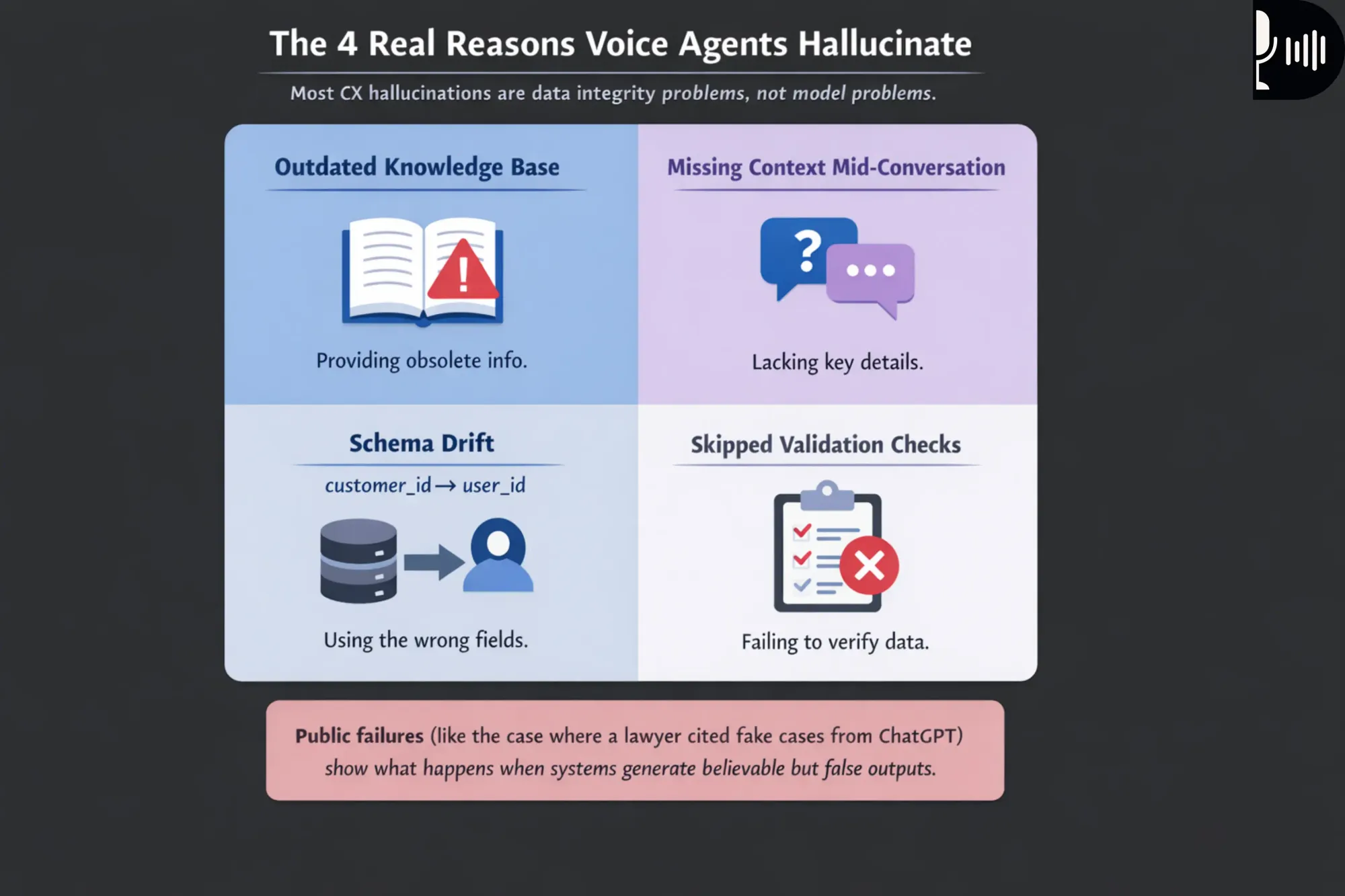
That also explains why "hallucinations" are often a data problem, not a model problem. AI hallucinations in CX happen when the system fills gaps left by bad or missing data, especially when knowledge bases are outdated, context is missing mid-conversation, or validation checks are skipped.
Single-database thinking breaks in production (scattered systems)
Real businesses do not run on one database. Data is spread across CRM, internal SQL, payments, support tools, and documents.
You also have informal knowledge buried in Slack threads and onboarding docs. Your voice agent needs to connect these sources, then decide which one is "truth" for each question.
This is why multi-system querying in real time is the backbone. A useful voice agent is basically: conversation + tool calls + data governance + latency discipline.
Real-time multi-system querying is the backbone of Dograh where voice agents seamlessly combine natural conversation, instant tool calls, strong data governance, and strict latency discipline to operate reliably in real-world production environments.

Myths that break voice AI agents in production
Many teams ship agents with the wrong mental model. These myths create brittle systems that fail under real callers.
- Myth: "A big knowledge base is enough."
A knowledge base helps with FAQs and policies. But it cannot tell you live table availability, payment status, or order state. - Myth: "One database can power the whole agent."
Your CRM, billing, and operational systems each have different sources of truth. A voice agent must query multiple systems and reconcile results. - Myth: "If a tool fails, the model can guess safely."
This is how you get fabricated confirmations and false refunds. Public failures show what happens when systems generate believable but fake outputs, like the case where a lawyer cited fake cases produced by ChatGPT. For voice agents, the risk is worse because the user expects immediacy and finality.
The real-time requirement: what your agent must do in one voice turn
A good voice agent resolves intent inside a tight time window. That time window includes speech recognition, reasoning, tool calls, and speaking back.
A practical example of a restaurant agent: menu + tables + bookings + payments
Imagine a simple restaurant reception agent built in Dograh. The caller asks: "Can you book a table for four at 8 pm, and charge the deposit?"
To do this well, the agent must fetch and validate four different things:
- Menu data (often from a CMS, Google Sheet, POS export, or docs)
- Live table availability/status (operational DB or booking system)
- Booking history (booking platform + internal DB for VIP notes)
- Payment and live updated prices (payment processor like Stripe)
If these are live queries, the agent can say:
- "Yes, 8 pm is available. The deposit is $20 per person. Do you want indoor or outdoor?" And then it can confirm booking + payment.
If it guesses based on stale data, it will overbook. Or it will quote the wrong deposit. Both outcomes create immediate distrust and support tickets.
This is the difference between a friendly voice interface and an operational agent. The operational agent must query multiple systems in real time.
Latency, turn-taking, and why "slow" equals "bad UX"
Voice is not chat. People interrupt quickly when the agent feels slow or confused.
A voice turn is the cycle where the user speaks, the system processes, and the agent speaks back. If the agent takes too long, the user assumes it is broken.
A quick overview on latency for realistic launch targets would be :
- Mouth-to-ear turn gap target 1,115 ms, upper limit 1,400 ms
- Platform turn gap target 885 ms, should not exceed 1,100 ms Component targets include STT 350 ms (upper 500 ms), LLM TTFT 375 ms (upper 750 ms), and TTS TTFB 150 ms (upper 250 ms).
Tool calls must fit inside what remains of that budget. That pushes you toward parallel queries, caching, and strict fallbacks.
Dograh can deliver sub-1000ms end-to-end latency with self-hosted deployment, giving teams real-time voice performance while retaining full control over data, security, and infrastructure.
Two kinds of answers: stored knowledge vs live system truth
You need two answer paths, and your agent must pick the right one.
Stored knowledge (KB/RAG) is best for:
- "What is your cancellation policy?"
- "Are you open on public holidays?"
- "Do you have gluten-free options?"
Live system truth (tools/APIs) is required for:
- "Is my table confirmed?"
- "What is my order status right now?"
- "Did my payment go through?"
- "Can you refund order #18492?"
In real calls, users mix both in one sentence: "I booked last week. What is your cancellation policy, and can you move my booking to 9 pm?"
That is one reason multi-system access matters. The agent must do KB retrieval and live booking checks in one flow.
Glossary (key terms)
- Fan-out/fan-in tool calls: Calling multiple systems in parallel (fan-out), then combining the results into one answer (fan-in). This is how you meet voice latency goals.
- Schema drift: When a field name, type, or meaning changes over time (for example, customer_id becomes user_id, or status values change). Drift silently breaks tools unless you detect it.
- Circuit breaker: A reliability pattern that stops calling a failing dependency for a short period. This prevents repeated timeouts during live calls.
- Idempotency key: A unique key used in "create/charge" actions so retries do not duplicate the action. This prevents double charges and double bookings.
- Voice turn: One cycle of user speech -> STT -> reasoning/tool calls -> TTS response. Voice UX lives or dies by turn timing.
Why multi-system queries are hard: the common failure modes
Multi-system querying sounds simple until you hit production. Most failures are predictable if you know where to look.
Latency killers: serial calls, chatty APIs, and slow databases
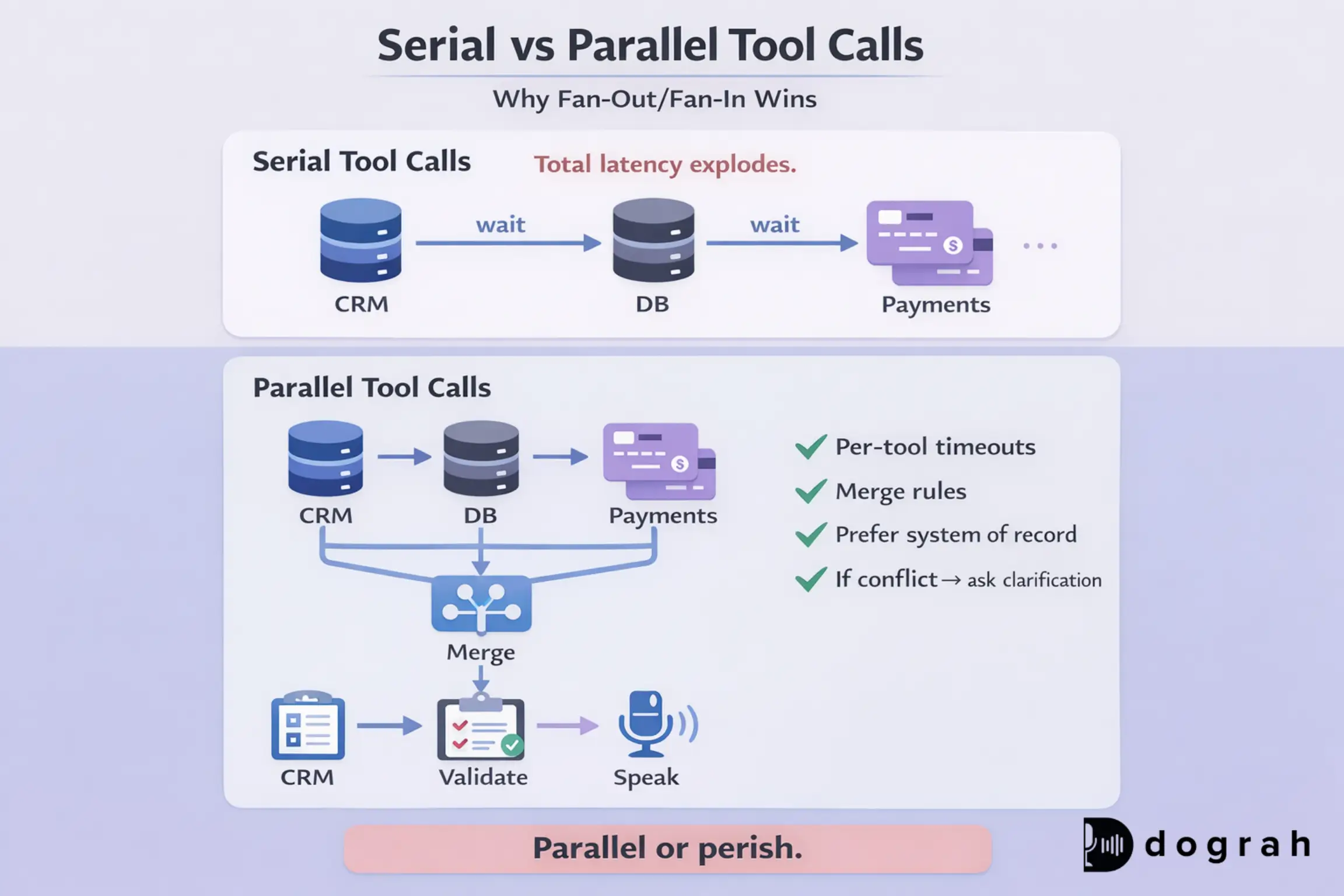
The biggest latency problem is serial tool calls. If the agent calls CRM, then DB, then payments, each adds waiting time.
Common latency killers when making tool calls:
- Sequential tool calls instead of parallel calls
- Too many round trips ("chatty APIs" that require 4-6 calls per task)
- Heavy SQL queries without indexes
- Cold starts in serverless connectors
- Slow vendor APIs during peak hours
- No timeouts (calls hang and the voice turn collapses)
Data mismatch: inconsistent schemas, duplicated fields, and schema drift
Even when systems respond quickly, they often disagree.
Common mismatch patterns:
- Different identifiers: customer_id vs user_id vs email
- Different status vocabularies: paid, settled, captured
- Duplicated fields with different meaning: address in CRM vs billing
- Docs that conflict with system truth: policy changed, KB not updated
- Schema drift breaking tool parsing and agent logic
This is one of the root causes of hallucinations: the agent sees conflicting truths. If you do not force a validation step, it will "smooth over" the conflict with a confident answer .
Auth and access problems: scopes, secrets, and "who can the agent act as?"
Voice agents are not just readers. They often need to take actions.
Auth failure modes:
- Tokens expired
- Scopes are too broad (unsafe) or too narrow (agent cannot complete tasks)
- Secrets leak into logs or prompts
- No clear "acting user" concept, the agent lacks proper authority boundaries and can execute actions it should never be allowed to perform.
In practice, auth issues show up as partial answers. That is when teams are tempted to let the model answer anyway. That is also where risk spikes.
Partial outages and rate limits: when only 1 of 5 systems responds
In production, one system will always be unhealthy. Your agent must still behave safely.
Common problems:
- Rate limits from CRM or payment platforms
- Timeouts from booking APIs
- Partial outage: KB works, payments down
- Dependency returns stale cached data during incidents
- Retry storms that make outages worse
If Stripe (or any payment rail) is slow mid-call, the agent must not claim success. It must offer a safe fallback that protects the user. We will discuss honest fallbacks later.
Reference architecture: the data backbone for voice AI agents
A solid architecture keeps your agent fast, safe, and correct. It also keeps your team from building one-off integrations forever.
The core pattern: unified data layer + connectors + indexing (where needed)
The winning pattern is consistent across serious deployments:
- A unified data layer that exposes stable tool contracts
- Connectors to systems like CRM, SQL databases, KB/docs, and payments
- Indexing only where it helps (mostly for unstructured docs)
This is exactly the integration problem that platforms like Peaka focus on solving: bringing many sources together behind a consistent access layer, so agents can query across them without hand-built glue code for every source.
For the API edge, I often recommend an API gateway to standardize auth, routing, and rate limits. A good example is Kong Gateway, which is built on NGINX and Lua and is designed for low-latency routing across services.
For databases, a clean way to expose controlled queries is an API layer like Hasura GraphQL Engine. It can generate a production GraphQL API over Postgres and helps you control access policies at the data layer.
Hot path vs cold path: what must be real-time vs what can be cached
Not all data needs a live fetch in every turn. Split your data into two paths.
Hot path (must be real time):
- Availability (tables, inventory, appointment slots)
- Payments (charge confirmation, refund status)
- Booking creation and confirmation
- Account state (locked, overdue, active subscription)
Cold path (can be cached with TTL):
- Menu descriptions and images
- Policies and FAQs
- Store hours (unless you change often)
- Static product descriptions
Caching rules that work well:
- Use short TTLs (Time to Live) for semi-dynamic data (like "today's specials")
- Re-check hot path right before confirming an action
- Cache KB/RAG results more aggressively, but track versioning
Fan-out/fan-in tool calls: parallel queries with timeouts and merge rules
Parallel calls are the only way to stay inside voice latency budgets. The core move is: query many systems at once, then merge.
Practical guidance:
- Run CRM lookup + booking availability + pricing fetch in parallel
- Set per-tool timeouts (for example 200-400 ms for hot calls)
- Use a merge policy:
> Prefer system of record for each field
> If conflicts exist, ask a confirmation question
> If a hot-path tool fails, do not take action
If only some tools return:
- Speak what you know is true
- Say what you could not confirm
- Offer a next step (text link, retry, or transfer)
Streaming updates and event-driven sync (when 'real time' needs pushes)
Polling works until it stops meeting your needs. If state changes rapidly, you need event-driven updates.
What is event-driven sync (vs polling) for real-time voice agents?
Event-driven sync means systems push changes as they happen. Polling means you keep asking "has it changed yet?" on a schedule.
Event-driven sync is better when:
- Booking slots change quickly
- Inventory updates constantly
- Payments move through states (created -> authorized -> captured)
- You need instant confirmation without extra API round trips
In practice, event-driven sync reduces stale answers during calls. A "booking created" event can update your internal state instantly. Then the agent can confirm accurately, even if the booking vendor API is slow.
Build tutorial: a working example with multi-system data calls (step-by-step)
This section shows a minimal, real pattern you can copy. It is tool-agnostic, and it maps well to Dograh-style workflows and webhooks.
Prerequisites (what you need before you start)
You will move faster if you have these ready:
- A booking data store (or booking SaaS API)
- A CRM (or a simple customer table)
- A KB(Knowledge Base) corpus (docs, FAQs, policies)
- A payment provider test environment
- A single integration-layer service for tools (recommended)
Define the agent tools: CRM lookup, SQL query, KB search, and Stripe charge
Define tools like you would define public APIs. Stable contracts reduce hallucinations and reduce breakage.
Here is a simple tool set:
- CRM Lookup Tool Input: phone or email Output: customer_id, name, vip_flag, notes, default_payment_method (optional) Allowed actions: read-only
- SQL Availability Tool Input: date, time, party_size, seating_pref Output: available=true/false, slot_options[], constraints Allowed actions: read-only
- KB Search Tool (RAG) Input: query, locale Output: snippets[], citations[], doc_version Allowed actions: read-only
- Create Booking Tool Input: customer_id, slot_id, party_size, notes Output: booking_id, status=pending/confirmed Allowed actions: write
- Stripe Charge Tool Input: amount, currency, customer_ref, idempotency_key Output: payment_id, status, receipt_url Allowed actions: write
In Dograh, these map cleanly to webhook steps inside a drag-and-drop workflow. You can also use "extract variables" from the call (party size, time, name) to fill tool inputs.
Text-to-SQL safely: query templates, read-only roles, and row limits
Text-to-SQL is powerful, but you must constrain it. The safest pattern is: the model selects from prebuilt templates.
Use these controls:
- Parameterized queries only (no string concatenation)
- Read-only DB role for all read tools
- Read replicas for availability queries
- Hard row limits (LIMIT 50)
- Column allowlist (do not expose PII by default)
- Explain-plan checks for slow queries on critical tables
Example availability query template:
SELECT slot_id, start_time, capacity_remaining
FROM table_slots
WHERE date = :date
AND start_time BETWEEN :start_min AND :start_max
AND capacity_remaining >= :party_size
ORDER BY start_time
LIMIT 20;
Example pseudo-commands and payloads
Concrete examples make tool calling predictable. Below are copy-friendly payloads you can adapt.
CRM lookup (REST)
Request
POST /tools/crm_lookup
Content-Type: application/json
{
"phone": "+1-555-0131"
}
Response
{
"customer_id": "cus_10291",
"name": "Asha Patel",
"vip_flag": true,
"notes": "Prefers quiet seating"
}
Agent speech use:
- "Welcome back, Asha. I can help with that."
KB search (RAG)
Request
POST /tools/kb_search
Content-Type: application/json
{
"query": "cancellation policy for same-day reservations",
"locale": "en-US"
}
Response
{
"snippets": [
"Same-day cancellations are allowed up to 2 hours before the reservation time..."
],
"citations": [
{ "title": "Reservations Policy", "doc_version": "2026-01-10" }
]
}
Agent speech use:
- "You can cancel up to 2 hours before. Do you want to keep 8 pm or move it?"
Availability check (SQL tool)
Request
POST /tools/check_availability
Content-Type: application/json
{
"date": "2026-02-14",
"time": "20:00",
"party_size": 4,
"seating_pref": "indoor"
}
Response
{
"available": true,
"slot_options": [
{ "slot_id": "slot_2000", "time": "20:00" },
{ "slot_id": "slot_2030", "time": "20:30" }
]
}
Create booking
Request
POST /tools/create_booking
Content-Type: application/json
{
"customer_id": "cus_10291",
"slot_id": "slot_2000",
"party_size": 4,
"notes": "Quiet seating"
}
Response
{
"booking_id": "bk_88110",
"status": "confirmed"
}
Stripe charge (with idempotency)
Request
POST /tools/stripe_charge
Content-Type: application/json
{
"amount": 8000,
"currency": "usd",
"customer_ref": "cus_10291",
"idempotency_key": "bk_88110_deposit_v1"
}
Response
{
"payment_id": "pay_99102",
"status": "succeeded",
"receipt_url": "https://example.com/receipt/99102"
}
Agent speech use:
- "Your table is confirmed for 8 pm for four, and the deposit is paid. I can text your receipt."
End-to-end flow: restaurant booking + payment confirmation inside one call
A tight voice flow keeps the user moving. Below is a practical one-turn-to-action sequence.
Step 1: Capture intent and entities
- Date, time, party size, seating preference
- Phone/email for lookup
Step 2: Fan-out tool calls (parallel)
- CRM lookup (who is calling)
- Availability check (hot path)
- Pricing/deposit lookup (hot path)
- Optional KB fetch (policy question)
Step 3: Confirm choices
- Offer available slots if requested time is not available
- Confirm deposit amount before charging
Step 4: Create booking (write)
- Create booking first or hold slot (depends on your system)
Step 5: Take payment (write)
- Charge using an idempotency key tied to booking ID
Step 6: Verify final state
- Confirm booking status = confirmed
- Confirm payment status = succeeded
Step 7: Speak the outcome
- Provide clear confirmation and next steps
- Offer SMS/email summary
Failure decision points (what to do)
- Availability tool fails: offer to transfer or take a callback request
- Payment fails: do not confirm booking as paid, offer another method
- Booking creation fails: do not charge, apologize and transfer to human
The "do not guess" rule is non-negotiable. It is also how you prevent brand damage and refunds.
Security and governance (differentiator): keep the data backbone safe
Security is part of product quality in voice. Because voice agents can take actions, the stakes are higher than chatbots. With Dograh, data security and residency come built in: self-hosted, OS deployment keeps data one hop closer, strengthens privacy and security, and makes compliance with regional data-residency norms straightforward by design.
Identity and permissions: least privilege, per-tool scopes, and acting user
The core rule is least privilege. Give each tool the minimum access needed.
Practical patterns:
- Separate read tools from write tools
- Use per-tool tokens with narrow scopes
- Map the caller identity to what they can access
- For sensitive actions, require a second factor (OTP) or explicit confirmation
"Who can the agent act as?" must be explicit. If the agent is acting on behalf of a customer, the tool layer should enforce that. Do not rely on prompt instructions for authorization.
Audit logs and traceability: prove what the agent accessed and did
If you cannot trace a bad call, you cannot fix it. Logging is also critical for compliance and incident response.
Log these items for each call:
- Correlation ID per voice call and per voice turn
- Tool calls made (name, start/end time, status)
- Tool inputs/outputs (with redaction)
- Which prompt/tool choice was made (high-level reasoning)
- Any human transfer or fallback path chosen
It is much simpler to use an LLM Observability tool here that does all of the above out of the box.
This is also your debugging gold. Many "LLM problems" turn out to be tool latency spikes or schema changes.
Compliance boundaries: PII handling, retention, and redaction rules
Compliance is simpler when you design for it early. Keep rules short and enforce them in the tool layer.
Basics that usually apply:
- Do not store full card data (ever)
- Mask PII in logs by default (phone, email, addresses)
- Encrypt secrets and rotate them
- Separate dev/staging/prod credentials and datasets
- Define retention windows for transcripts and tool traces
- Use allow lists for what fields can be returned to the agent
Reliability playbook: guardrails so the agent does not guess
Reliability is a product feature in voice. Users will not tolerate uncertain confirmations. Going too deep into reliability is out of scope for this article, but we should definitely discuss consciously adding fallbacks in your system and safe actions when interacting with your databases.
Fallbacks that are honest: partial answers, confirmations, and call transfers
Fallbacks should protect the user and protect the brand. They must be truthful and action-safe.
Safe fallback options:
- Provide partial info with clear uncertainty: "I cannot confirm payment status right now."
- Ask for confirmation and retry once
- Offer to send a text link for self-service
- Create a support ticket with a reference number
- Transfer to a human for hot-path actions
Avoid:
- Invented booking IDs
- "Your payment is confirmed" without payment truth
- Overconfident policy answers without citations
This aligns with the core hallucination drivers: outdated KB, missing context, and skipped validation checks.
Idempotency and safe actions: avoid double bookings and double charges
Retries are common in distributed systems. So you must make write operations safe.
Use these patterns:
- Idempotency keys for payment calls or anything that requires uniqueness or dedupe(tie to booking ID + action type)
- "Create then confirm" flows where you can roll back safely
- Store action state in a durable store so the agent can resume safely
This is how you prevent the worst-case outcomes:
- Double charges during retries
- Two bookings for one caller
- Conflicting confirmations across systems
Dograh AI : Offers multi-agent workflows + Looptalk to stress test data failures
Dograh is built for teams that treat voice agents as production systems, not demos.
1. Real-time system orchestration
Through webhooks and tool calls, Dograh agents can call any external API or workflow in real time - CRMs, payment gateways, Zoom/Calendar, SMS/email services, or even an n8n automation. It’s not just voice; it’s a full automation platform.
2. Structured multi-agent workflows
Decision-tree nodes enforce deterministic steps like “verify availability” before “confirm booking.” This prevents agents from hallucinating across systems and ensures data is validated before response.
3. Knowledge + RAG built-in
Agents can query company knowledge bases and live systems during the call. Variable extraction from conversations allows automatic follow-ups, CRM updates, or triggered workflows.
4. Production-grade telephony
Inbound and outbound calling, call transfers, and SIP connectivity. Deploy as a website widget or via any telephony provider. Bring your own STT, TTS, and LLM.
5. Multilingual + domain-aware STT
Default support for 30+ languages with mid-call switching. Can extend to hundreds via other providers. Custom STT dictionaries preserve business terms like “KYC,” “HbA1c,” or “OPD” accurately.
6. Security and deployment flexibility
Cloud-hosted or self-hosted open source. On-prem deployment reduces data hops and helps meet data residency and privacy requirements.
7. Looptalk testing engine
Voice bots test voice bots. Simulate interruptions, tool timeouts, CRM rate limits, or edge-case personas to stress test failure paths before going live.
Dograh provides the infrastructure layer required when voice agents must reliably query multiple systems in real time- without guesswork, hallucination, or brittle integrations.
Conclusion: the voice agent is the interface, but data is the product
A voice agent's brain is not just the LLM. It is the data backbone: connectors, tool contracts, governance, and latency budgets.
If you want a voice agent that users trust, you need this foundation:
- Data access with Parallel tool calls- with strict timeouts
- Safe write actions with idempotency
- Honest fallbacks and strong auditability
If your current plan is "ship the voice layer and patch integrations later," expect a short-lived demo and a painful production rollout. Build the data and tools backbone with your voice agents in parallel, or do not be surprised when callers lose confidence after the first failed confirmation.
Related Blog
- Discover the Self-Hosted Voice Agents vs Vapi : Real Cost Analysis
- Explore how Conversational AI in Banking Works with Practical Guide (12 Use Cases + KPIs).
- A Practical Cost Comparison Self-Hosted Voice Agents vs Retell: Real Cost Analysis (TCO Tables + $/Min).
- Explore Conversational AI for Sales: Essential Guide [Dograh vs LiveKit/Pipecat]
- See how 24/7 Virtual Receptionist Helps Small Firms Win More Clients by boosting responsiveness and improving customer engagement.
- Explore Conversational AI in Insurance: Ultimate Guide (Voice Agents + FNOL)
- Check out Contact Center Automation Trends: Ultimate Guide (2026 Roadmap + Open-Source Voice Agents)
FAQ's
1. Why is querying multiple systems in real time the data backbone of Voice AI agents ?
Real callers don’t just want a friendly conversation, they want the agent to finish work with certainty. If a voice agent can’t pull fresh data like order status, booking availability, pricing, or account state, it will guess, and that’s where trust breaks.
2. What systems should a Voice AI agent integrate with to handle real customer calls ?
Start with the systems that represent “truth” during a call. For most teams, that means a CRM (customer profile, entitlement, notes), a core database (orders, inventory, bookings), and payments (Stripe for charges, refunds, invoice status). Then add operational tools like a support desk (tickets, SLAs), scheduling/calendar, and a knowledge base for policies and FAQs.
3. How do you prevent wrong answers when one system is outdated, rate-limited, or temporarily down ?
Treat reliability as a product feature: enforce clear data-governance rules, use safe fallbacks instead of guessing when systems fail, and design for multi-system reality with parallel queries, short-lived safe caching, and full audit logs.
4. What data sources do AI agents commonly use ?
AI voice agents typically pull data from CRMs, operational databases, booking and payment systems, and KB, because without real-time access to these systems of record, the agent is forced to guess, and that’s exactly where production trust breaks.
5. What is the backbone of an AI Voice Agent ?
The backbone of an AI voice agent is real-time access to multiple systems of record, data connectors, tool calls, governance, and latency control, so the agent can fetch fresh truth, act safely, and never guess.
Was this article helpful?
