
When it comes to pricing voice agents, don't focus on listed prices. The number that matters is the fully- loaded cost per minute, not the headline rate. This blog breaks down real TCO (Total Cost of Ownership) for self-hosted voice agents (Dograh, Pipecat, LiveKit, Vocode style stacks) vs Bland. The article is written for builders and operators who expect to run 10k, 100k, or 1M minutes/month and want cost math they can trust and accept.
Real Voice AI Cost
By the end of this post, you’ll clearly understand what you really pay per minute and where the extra costs come from. You will also see where self-hosting wins on cost, latency, debugging, and compliance at scale. Vapi shows up in the SERP a lot, but this post focuses on Bland vs self-hosting because cost confusion is highest there.
Total cost per minute
The advertised price is usually lower than what you actually pay. Voice bot also includes failure costs: retries, transfers, dead air, hangups, longer calls and support time.
In my own deployments, the surprise was not the per-minute rate. The surprise was how fast the bill moved when we had small reliability issues (carrier-specific failures, latency spikes, and missing timeouts).
What "self-hosted" means in voice
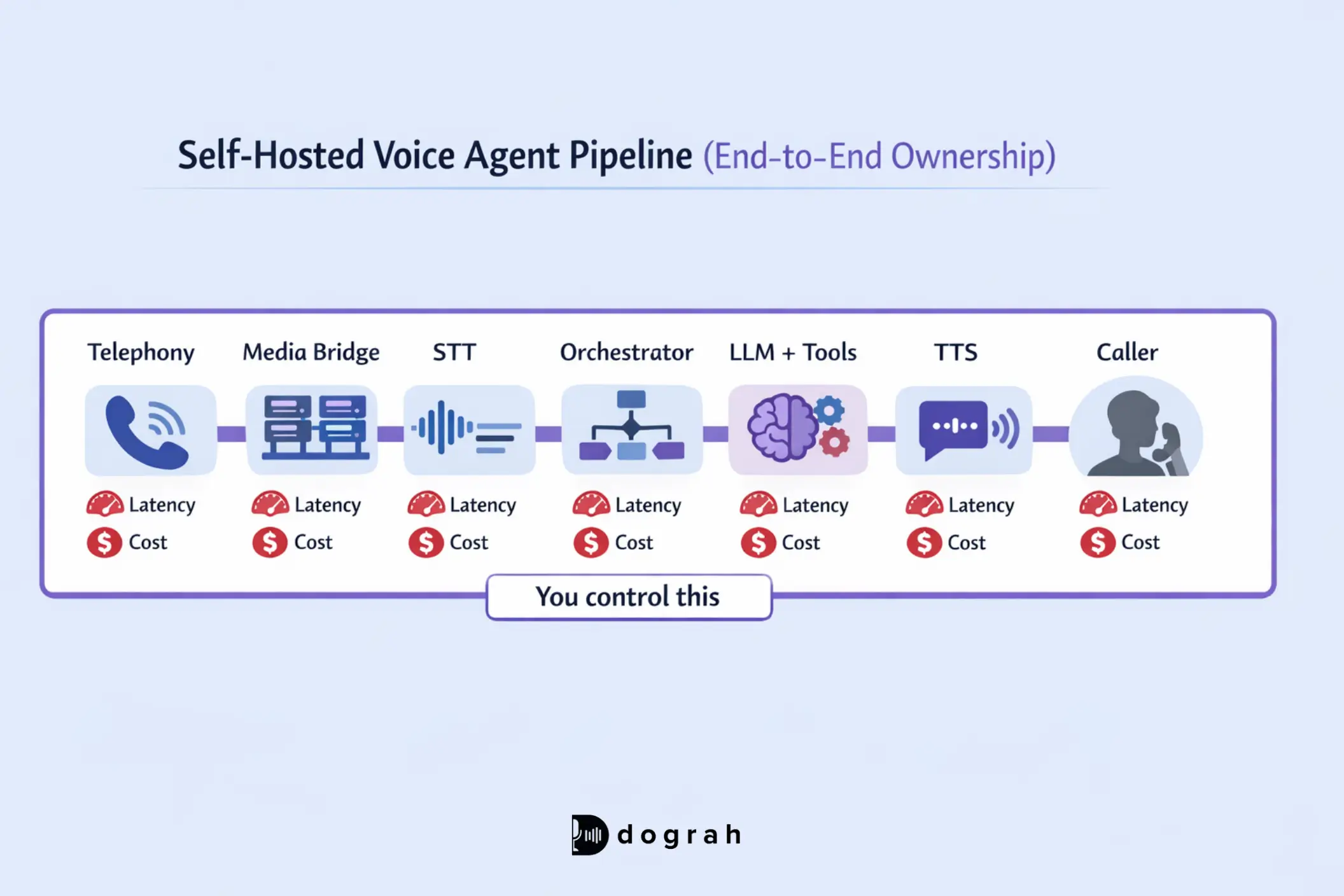
Self-hosted means you own/control the pipeline, end to end. Dograh ai enables self-hosted deployments that give you full compliance, data control, and visibility across the entire voice pipeline. That usually includes:
- Telephony (SIP trunks, inbound/outbound, transfers)
- Media routing (WebRTC/SIP bridges, relays, TURN if needed)
- STT (streaming speech-to-text)
- Orchestration (turn-taking, barge-in, tool calls, state, retries)
- LLM (reasoning + tool decisions)
- TTS (streaming text-to-speech)
- Logging/monitoring (per-turn timings, traces, recordings, audits)
Self-hosted does not mean free. User still need pay for vendors and infrastructure:
- Twilio/Telnyx minutes
- Deepgram (or other STT)
- ElevenLabs (or other TTS)
- LLM tokens
- Compute, bandwidth, logging, on-call time
Quick pricing preview
Below ~10k minutes/month, managed platforms can be simpler. Above ~100k minutes/month, the cost gap can become decisive: ~ $0.03-$0.04 raw cost vs ~ $0.10-$0.15 platform pricing based on real deployments.
Under about ~10k minutes a month, managed platforms are simpler to use. Above ~100k minutes a month, the cost difference really matters: around $0.03 - $0.04 in raw costs versus $0.10 - $0.15 on platforms, based on real usage.
At 100k minutes/month, that difference is not "nice to have". It can decide whether your product has a margin.
Table of Contents
- Myths to ignore before you run the math
- Assumptions box: the TCO model inputs (copy/paste friendly)
- The cost math: fully-loaded per-minute formula (Bland vs self-hosted)
- Real cost breakdown: 3 scenario tables (low, mid, high volume)
- Practical self-hosted stack guide (Dograh, Pipecat, LiveKit, Vocode, GitHub projects)
- Security and compliance checklist (simple and strict)
- Final checklist: choose the best AI voice agents platform for your situation
- FAQ
Glossary (key terms)
- Non-compressible network latency: Latency you cannot optimize away with faster code. It comes from physical distance, routing, and vendor hops. In voice, every hop adds delay that users feel instantly.
- Tail latency (p95/p99) for voice turns: The slowest 5% or 1% of turns. Averages can look fine while p95 causes barge-in failures and awkward pauses. Tail latency is what breaks live calls.
- Streaming backpressure (in real-time audio pipelines): When downstream systems (STT/TTS/bridges) cannot keep up, audio gets buffered. Users then get responses 2-4 seconds late, even if compute is healthy.
- TCO (Total Cost of Ownership): Fully-loaded cost including vendor minutes, tokens, infrastructure, monitoring, engineering time, and failure overhead.
Cost Model Assumptions
These assumptions show the setup used to calculate costs, based on a realistic, mid-size voice AI system.
Baseline assumptions we will use 100k min/month model
- Usage: 100,000 minutes/month
- p95 concurrency: 40 (bursty traffic without surprise throttling)
- Telephony: Twilio SIP inbound ~ $0.0085-$0.01/min (US blended)
- STT: Deepgram ~ $0.004-$0.006/min (real-time)
- TTS: ElevenLabs ~ $0.01-$0.015/min spoken
- LLM: GPT-4o-mini tokens ~ 1.5-2.5k tokens per call minute (bidirectional)

Cost Breakdown for Bland vs Self-hosted
The formula below is the real work. Most pricing pages only show one term.
Per-minute fully-loaded cost formula
Fully-loaded cost per minute:
- Telephony (carrier minutes + connection fees)
- STT (streaming speech-to-text minutes)
- TTS (spoken audio minutes)
- LLM tokens (input + output tokens per minute)
- Infrastructure/ops (compute, bandwidth, logging, on-call)
- Failure overhead (retries, transfers, longer calls, hangups)
- Engineering amortization (build + maintenance spread over minutes)
Simple version:
Cost/min = Telephony + STT + TTS + LLM + Infrastructure + Failure overhead + Engineering amortization
Bland pricing model
Bland publishes a usage-based baseline that many teams treat as the price. But you need to include minimums and add-ons.
From Bland's docs:
- $0.09/min inbound and outbound voice calls (baseline)
- Minimum outbound call charge: $0.015 per call attempt
- Transfers: $0.025/min (using Bland numbers)
- Transfers are free with your own Twilio (BYOT)
- SMS: $0.02 per message (in/outbound)
- Voicemail: $0.09/min
- Extra for multilingual transcription/voices, voice cloning, custom LLM hosting, advanced integrations, premium support
- Some enterprise features (higher concurrency, volume discounts) require a contract
That means your $0.09/min can become $0.09/min + transfer minutes + SMS + minimum attempt charges. The doc example also shows how quickly it adds up:
- 5-minute call costs $0.45
- Add a 3-minute transfer: +$0.075
- Send a follow-up text: +$0.02
- Total per engagement: $0.545
Also note the floor: 100 failed calls connected cost at least $1.50 via minimum charges.
Self-hosted pricing model
Self-hosted usually means bring your own keys for each component. Your cost becomes more transparent and more controllable.
Typical self-hosted Cost:
- Telephony (Twilio/Telnyx)
- STT (Deepgram, Google STT, etc.)
- TTS (Cartesia, ElevenLabs, etc.)
- LLM tokens
- Infrastructure (compute + bandwidth + logging)
The strategic difference is not that vendors are free. You can switch vendors, change regions and decide where the money goes.
Hidden Costs That Matter in Real Voice AI Deployments
These costs are often bigger than people expect:
- Engineering time (build + maintenance)
- Monitoring and observability (traces, per-turn timings, audio slices)
- On-call and incident time
- Compliance work (PII routing, retention, encryption, DPAs/BAAs)
- Latency-driven hangups and longer calls
- Failed calls and retries
- Vendor lock-in and migration cost
In real deployments, observability gaps alone can cost weeks. If you cannot see per-leg timing, you cannot fix "it feels laggy".
Real cost breakdown for 10k, 100k and 1M mins
These scenarios show how cost behaves as volume rises. We have used the contextual Q&A fully-loaded numbers from production-style deployments.
Scenario 1: 10k minutes/month
At low volume, platform simplicity can be attractive. Self-hosting can still be cheaper on raw minutes while feeling expensive in time cost.
If you only run 10k minutes/month, self-hosted savings may not feel huge. You still need basic monitoring and reliability work.
Scenario 2: 100k minutes/month
At this scale, the gap starts to matter. This is where platform margin becomes your biggest line item.
Self-hosted line items (example model):
Now compare totals:
Above ~100k minutes/month, the difference reshapes whether the product has acceptable margin.
Scenario 3: 1M minutes/month (scale economics)
At 1M minutes/month, platform fees can dominate the P&L. Self-hosting only works here if you have real operational maturity.
To capture these savings, you need:
- Multi-region planning
- Strong monitoring
- Safe deployment practices
- Clear budget caps
Bland AI vs Open Source Voice Agents: Which to Choose ?
Discover Bland vs Open-Source voice agents like Dograh, Pipecat, LiveKit, and Vocode to decide the best option for cost, control, and scale.
When self-hosted becomes cheaper
Break-even is driven by minimums, margins, and failure costs. It is not driven by engineering purity.
Break- even chart: minutes/month vs total monthly cost
If you plotted the scenario totals, you would see:
- Bland starts simpler at low volume
- Self-hosted has a fixed ops baseline, then flattens
- Past ~100k minutes/month, the curves separate quickly
Why the curves diverge:
- Platforms bake in margin and risk
- Your raw costs (telephony/STT/TTS/LLM) scale closer to linear
- Your infrastructure cost per minute usually drops with volume
Sensitivity analysis: what moves break-even the most
The biggest break-even movers in voice are usually:
- TTS cost (often dominant in natural-sounding agents)
- Failure rate (retries and longer calls)
- Tokens/min (agents that ramble are expensive)
- Telephony rate (less flexible than other components)
- Tail latency (drives hangups, which drives retries and transfers)
Concurrency also affects cost. High peak usage without limits can push you into higher plans or cause throttling.
The performance angle: 200ms saved can reduce hangups and cost
Latency is not only a UX metric. It affects cost.
In production testing, we measured ~180ms of non-compressible latency on a leading platform. When we moved to a colocated self-hosted setup, that latency disappeared.
Guidance used for this post: colocation can often save ~200ms in network calls alone.
Why that changes cost:
- Fewer awkward pauses means fewer hangups
- Better barge-in means fewer repeated turns
- Shorter calls means fewer minutes billed
- Less need for transfers means fewer transfer minutes
Synthflow vs Open Source Voice Agents: Which to Choose ?
Explore Synthflow vs Open-Source voice agents like Dograh, Pipecat, LiveKit, and Vocode to find the best option for cost, control, and scalability.
Side-by-side comparison Self-hosted (Dograh, Pipecat, LiveKit, Vocode) vs Bland
This table is the fastest way to pick a direction. It reflects what changes cost, speed, and risk.
Comparison table: pricing, setup effort, scaling, compliance, support
Latency and call experience
Voice quality can be good while the call still feels slow. That is a common failure mode in live calls.
From real experience, some managed platforms (Bland, Retell) feel sluggish during turn-taking and live calls. Self-hosting lets you colocate telephony, STT, orchestration, and models, which removes avoidable round-trip time.
STT latency is a key piece here. Deepgram Nova-2 reports sub-100ms recognition latency in streaming mode, with ~420ms average end-to-end and p95 under 500ms in voice agent tests.
Compare that with Whisper-style streaming behavior:Streaming latency ~ 1-2.5s for initial tokens, often unsuitable for sub-second turn-taking
This is why stack choices matter. A cheap STT that adds 1-2 seconds can cost you more in hangups and longer calls.
Why Warm Transfers and SMS Matter for SMB Voice AI
Warm transfers and SMS are core for SMB operations: missed calls, appointment reminders, human handoff.
Bland is a weak fit for many SMBs under $5k/month because common tools like warm transfer and SMS can be contract-gated in practice. That blocks real-world call flows.
Self-hosting makes these implementable:
- Warm transfer via Twilio call control and your workflow
- SMS via your telephony provider
- Advanced routing via your own decision tree and webhooks
Dograh is designed for this style of flexibility:
- Drag-and-drop builder
- Plain-English workflow editing
- Multi-agent workflows to reduce hallucinations
- Multilingual voice supports upto 30 languages
- Mid call language switching
- Bring-your-own-keys across vendors
- Webhooks to call your own API's or any other workflows
- Self-hostable, fully open source
Compliance and data control
Compliance is about data paths and controls, not badges. Adding a platform can add another processor of transcripts and recordings. Dograh AI reduces risk by removing extra vendor hops and makes it easier to meet privacy and data residency requirements through its open-source, self-hosted architecture.
Self-hosting can reduce surface area:
- Fewer vendors touching PII
- Clear retention and deletion policies
- Direct audit trails from your logs and storage
But you must implement:
- Encryption at rest
- Access controls
- Audit logs
- Retention controls
- Vendor DPAs/BAAs where required
Hidden costs and failure modes from real deployments
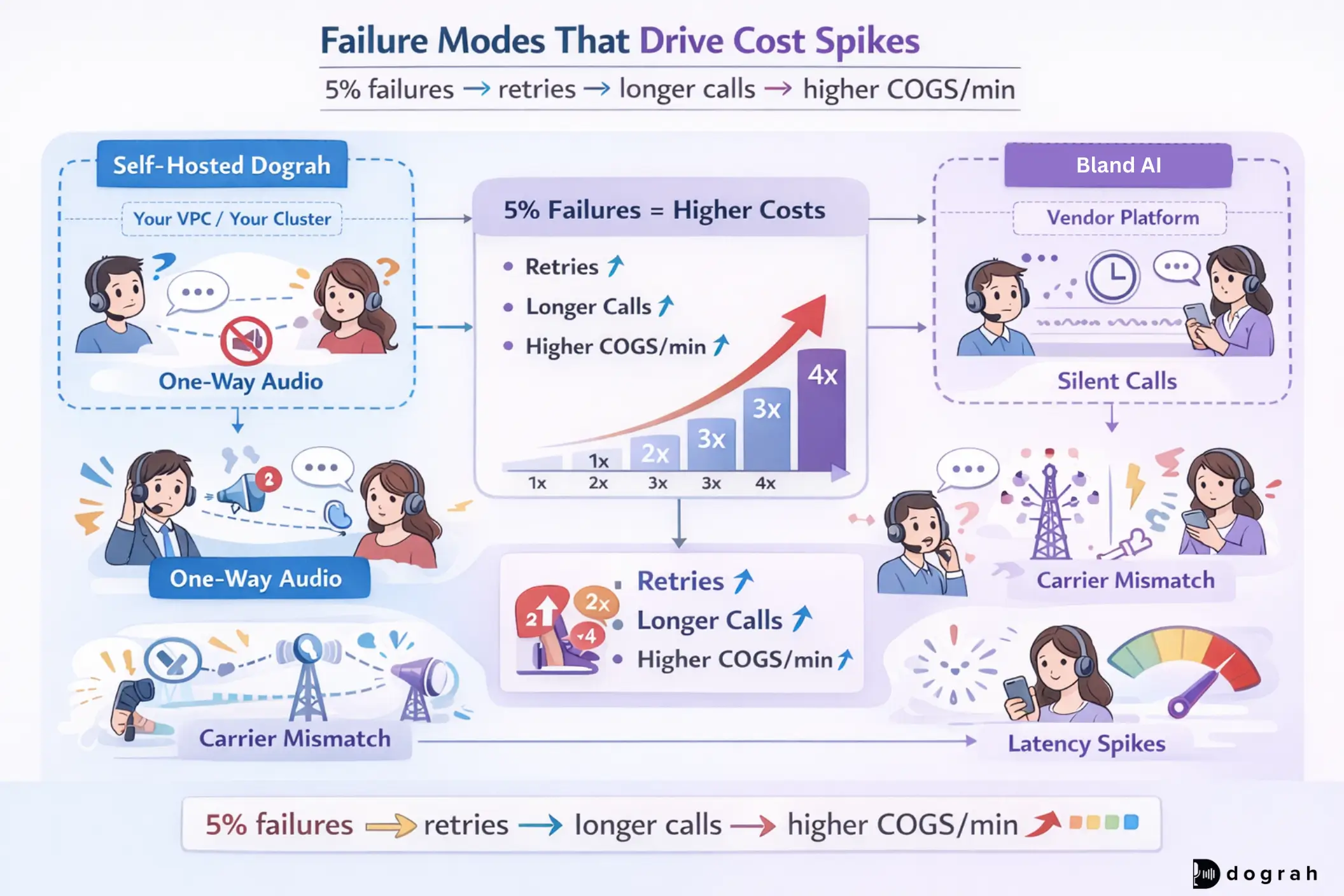
These failure modes show up in real voice systems, not demos. They directly change your cost per minute.
Dropped calls and dead air: SIP/media routing edge cases
The worst voice bugs are when callers say "it just went silent". Common causes include one-way audio after network changes, NAT (Network Address Translation) or TURN (Traversal Using Relays around NAT) issues on mobile networks, and carrier region mismatches that cause some calls to fail.
Fixes that worked:
- Multi-region media relays
- Explicit codec pinning (PCMU/OPUS)
- Per-carrier health checks
- Automatic failover to backup trunks
A 5-10% failure rate is not only a reliability issue. It is a cost multiplier because retries and support calls pile up.
Latency regressions break barge-in
Average latency can look fine while the worst 5% destroys UX. Incidents we have seen:
- STT model version increased tail latency by 300-500ms
- LLM routing to a cheaper region added ~800ms RTT (Round Trip Time), breaking barge-in and causing hangups
Billing surprises
Billing surprises are usually small bugs with big multipliers. Incidents:
- Agent repetition loops causing 10x token usage
- No silence timeout means abandoned calls burn budget
Fixes:
- Per-call caps (max tokens, max minutes)
- Hard budget guards
- Anomaly alerts on COGS/min (Cost per mins) spikes
Retell AI vs Open-Source Voice Agent Platforms: Which to choose ?
Compare Retell AI with Open-Source voice platforms like Dograh, Pipecat, LiveKit, and Vocode on cost, control, and scalability.
Build vs Buy decision guide
The right answer depends on your team, volume, and compliance scope.
Solo founder / indie hacker
If you need to ship fast, a managed platform can get you to a demo quickly. Plan an exit path if you expect growth.
A practical approach that works:
- Start with a simple stack and measure tokens/min, hangups, and transfer rates
- Move to self-hosting once you approach the 100k min/month range
Dograh is a good fit when you want:
- Quick iteration with a visual builder
- Bring-your-own-keys
- Call transfer , iNbound and outbound calling, connect to any SIP
- Knowledge base: the voice bot can access (RAG into) company data
- Website widgets to enhance user experience
- Open source self-hosting for control
SMB ops team (<$5k/month budget)
Many SMB call flows require:
- Warm transfer to a human
- Sending SMS confirmations
- Custom routing rules
Bland usually becomes a poor fit under ~ $5k/month, because important features are locked behind contracts or extras, even though the baseline per-minute price looks simple.
Self-hosting gives you direct access to telephony features:
- Twilio call control for warm transfer
- SMS using your provider pricing
- webhooks into your CRM and scheduling tools
Enterprise (100k+ min/month)
At 100k+ minutes/month, cost and compliance become board-level topics. Self-hosting (or managed self-hosting where you still own keys and data paths) is usually the right move.
What enterprises should standardize:
- p95 latency SLOs for each hop (STT/LLM/TTS)
- Multi-region routing for media and telephony
- Retention windows for transcripts and recordings
- Encryption at rest and audit logs
- Budget guards and anomaly detection
Bland is enterprise-focused and offers managed self-hosted infrastructure. That can help, but users still need to evaluate data paths, vendor contracts, and how much you can control.
Practical self-hosted stack guide
Self-hosting works when you treat it like a pipeline, not a single tool. This section gives a reference architecture .
Reference architecture: telephony > media > STT > LLM/tools > TTS
A standard real-time pipeline:
- Telephony (SIP / PSTN)
- Media gateway (SIP > WebRTC or RTP handling)
- Streaming STT (partial transcripts, word timings)
- Orchestrator (state machine, barge-in, tools, memory, retries)
- LLM and tool calls (CRM, scheduling, ticketing)
- Streaming TTS (low-latency audio)
- Media back to caller
Where latency accumulates:
- SIP/media bridging
- STT partial delay
- LLM RTT (Round Trip Time) and tool RTT
- TTS first audio chunk time
- Network hops between each service
Colocating these services reduces RTT and protects barge-in behavior.
STT choice is crucial for responsiveness:
- Deepgram Nova-2: sub-100ms recognition latency, ~420ms average end-to-end, p95 ~ 500ms in tests.
Open source options: Dograh vs Pipecat vs LiveKit vs Vocode
Pick based on what problem you need to solve first. Do not pick based on hype.
- Dograh: best when you want a visual workflow builder, intuitive UI, fast iteration, multi-agent workflows, and full self-hosting with BYO keys.
- Pipecat-style pipelines: best when you want composable real-time building blocks and you already have engineers comfortable assembling the stack.
- LiveKit: best when you want robust real-time media infrastructure (WebRTC) and need reliable media routing primitives.
- Vocode-style SDKs: best when you want a code-first developer experience and are comfortable implementing missing ops pieces yourself.
Dograh stands out because it gets you to a working call flow fast (2 min launch), without hiding the pipeline while keeping the system open and self-hostable.
Observability and debugging: log every hop
Voice debugging is hard everywhere. Self-hosting does not make it easy. It lets you instrument deeply.
What to log from day one:
- Per-turn timing: STT partials, final transcript time, LLM RTT, TTS first audio chunk
- Call graphs tied to a single call ID
- Audio slices around failures (with strict retention)
- VAD decisions and barge-in triggers
- Vendor response codes and throttling events
You can use OSS tracing tools like Langfuse or build your own. The key is to make "users say it feels laggy" a 10-minute investigation, not a 3-week rebuild.
The best AI voice agents platform for your situation
If you need fast setup and you are below 10k minutes/month, a managed platform can be simpler. Model minimum attempt charges, transfer minutes, and SMS costs using published pricing.
If you are approaching 100k minutes/month, self-hosting is usually the economic choice. Real deployments show ~ $0.035/min self-hosted (~ $3.5k/month) vs proprietary ~ $0.12/min (~ $12k/month) at 100k minutes/month. That gap can make or break margin.
Self-hosting does not make voice easy. It makes cost control, performance tuning, debugging, and compliance achievable because you own the pipeline.
If you want the self-hosted route without losing speed, Dograh's approach is straightforward:
- Build workflows in plain English with a drag-and-drop builder
- Keep full BYO keys and vendor choice
- Stay open source and self-hostable
- Test with Looptalk-style AI-to-AI testing as you harden reliability
Related Blog
- Discover the Self-Hosted Voice Agents vs Vapi : Real Cost Analysis
- A Practical Cost Comparison Self-Hosted Voice Agents vs Bolna AI: Real Cost Analysis (DPDP-Safe TCO)
- A Practical Cost Comparison Self-Hosted Voice Agents vs Retell: Real Cost Analysis (TCO Tables + $/Min).
- Explore Voice AI for Law Firms: Why We Chose Quality Over Latency By Alejo Pijuan (Co-Founder & CEO @ Amplify Voice AI, AI Ethics Thought Leader, Expert Data Scientist, Previously senior data scientist at Nike.)
- See how 24/7 Virtual Receptionist Helps Small Firms Win More Clients by boosting responsiveness and improving customer engagement.
- Learn how From Copilots to Autopilots The Quiet Shift Toward AI Co-Workers By Prabakaran Murugaiah (Building AI Coworkers for Entreprises, Government and regulated industries.)
- Check out "An Year of Building Agents: My Workflow, AI Limits, Gaps In Voice AI and Self hosting" By Stephanie Hiewobea-Nyarko (AI Product Manager (Telus AI Factory), AI Coach, Educator and AI Consultancy)
FAQ's
1. What is a voice agent?
A voice agent is a system that understands spoken input, reasons using NLP and LLMs, and responds by speaking back, using STT for listening and TTS for replying.
2. What is the best AI voice agent?
There’s no single “best” AI voice agent, but self-hosted open-source stacks (Dograh, Pipecat, LiveKit, Vocode) are often better than proprietary tools because they give you more control, flexibility, and lower long-term cost.
3. Is self-hosting a voice agent cheaper from day one?
No. At low volume (under ~10k minutes/month), managed platforms can be simpler. Self-hosting becomes clearly cheaper as volume grows.
4. When does Bland make sense?
Bland can work well for quick demos or low-volume use, especially if you don’t need advanced routing or transfers early.
5. When does self-hosting break even?
Usually around 50k - 100k minutes/month, depending on call length, failures, and TTS cost.
6. Do I need to build everything myself to self-host?
No. You don’t need to build everything from scratch, tools like Dograh, Pipecat, LiveKit, and Vocode provide the core building blocks, while still letting you own and customize the pipeline.
Was this article helpful?
