
If you search "AI voice agents GitHub", you usually want one thing: repos that actually let you talk to a bot in real time. Not a chatbot demo that "could" become voice later.
This guide is a builder-first roundup. You will get practical picks, real-time pipeline basics, and fast starter paths for both web voice and phone calling open source ai voice agent agents like Dograh AI, Livekit, Pipecat and Vocode.
What "AI voice agents GitHub" usually means (and what you will get here)
If you want an Open-source code that supports streaming audio , not just text prompts. Key requirements include barge-in, turn-taking, and acceptable latency. For building calling agents, telephony streaming and DTMF (Dual-tone multi-frequency).
This roundup focuses on repositories and frameworks that can realistically be built on today, along with criteria for evaluating whether a project is actively maintained and production-ready.
What this roundup covers (real-time voice assistants + calling agents)
You will get a curated list of GitHub projects across four buckets:
- Full platforms (UI + workflows) to build fast
- Real-time frameworks (build your own agent loop)
- Telephony/calling-focused projects (Twilio/Plivo/SIP patterns)
- Speech-to-speech and TTS components (for voice quality and speed)
Dograh GitHub repo had a dedicated "Show HN" post on Hacker News, which signals real developer interest in building and testing voice agents quickly.
Use this selector to choose your starting point:
- If you need a UI + workflows + fast iteration + self-hosted + low latency, choose Dograh AI.
- If you need WebRTC-first real-time voice with tight infra integration, choose LiveKit Agents (see the LiveKit GitHub org).
- If you need high-control pipelines and transport flexibility, choose Pipecat.
- If you need telephony-style calling patterns with lots of provider switches, evaluate Vocode.

Myths that waste time (and what is true)
Most teams lose weeks because they assume voice is just chat + microphone. That assumption breaks as soon as you care about latency, interruptions, and audio transport.
Myth 1: You need a GPU to run any voice agent.
Reality: Many real-time stacks run fine on CPU if you use hosted STT/TTS and keep your local code focused on orchestration. GPUs help for local STT/TTS or heavy multimodal workloads, but they are not required for a working agent.
Myth 2: Any chatbot repo can become a real-time calling bot with no extra work.
Reality: Calling agents need streaming audio in/out, end-of-turn detection, barge-in, and telephony constraints (codec, sampling rate, jitter). A chat UI repo usually has none of that.
Myth 3: Telephony audio is the same as web audio so integration is always easy.
Reality: Telephony often runs narrowband, different codecs, and strict streaming constraints. Sampling-rate mismatches and buffering issues show up immediately in STT accuracy and latency.
 Dograh AI
Before you choose: the voice agent pipeline and what "real-time" needs
Real-time voice is mostly about managing small delays across multiple moving parts. The repo you pick should make those moving parts visible and configurable.
Core pipeline: Audio in -> STT -> LLM -> TTS -> Audio out
A real-time voice agent loop typically looks like this:
- Audio in : Microphone audio (web) or call audio (telephony) arrives as frames/packets.
- VAD + endpointing (turn detection) : You detect when the user is speaking and when they stop. This drives responsiveness.
- STT (Speech-to-Text) : Streaming transcription as partial and final results.
- LLM orchestration : Tool calls, retrieval, memory, guardrails, and response streaming.
- TTS (Text-to-Speech) : Streaming audio output, ideally starting quickly and continuing as text streams.
- Audio out : WebRTC/WebSocket playback for web, or telephony streaming back into the call.
If you want natural interaction, you also need:
- Barge-in: user interrupts while the bot is talking
- Interruption handling: stop TTS, cancel LLM, keep the conversation state consistent
- Echo and noise handling: especially in speakerphone use cases
- Jitter buffers: for WebRTC/telephony network variance
Latency targets matter. A practical set of targets is:
- STT target: 50-250ms, with streaming buffers often 100-250ms to balance speed and accuracy .
- TTS target: 50-150ms to first audio, with streaming neural TTS often producing initial audio in ~100-250ms for a ~5s response .
- End-to-end ideal: <600-800ms, and if possible <400ms feels great. The same guide notes TTFT (time-to-first-token) ~200-300ms, with examples like Gemini ~280ms and GPT-4o ~250ms .
- UX note: humans notice gaps. >700ms can feel artificial, while <1s end-to-end is a good baseline .
 Stephanie Nyarko PMP, CSPO, ACP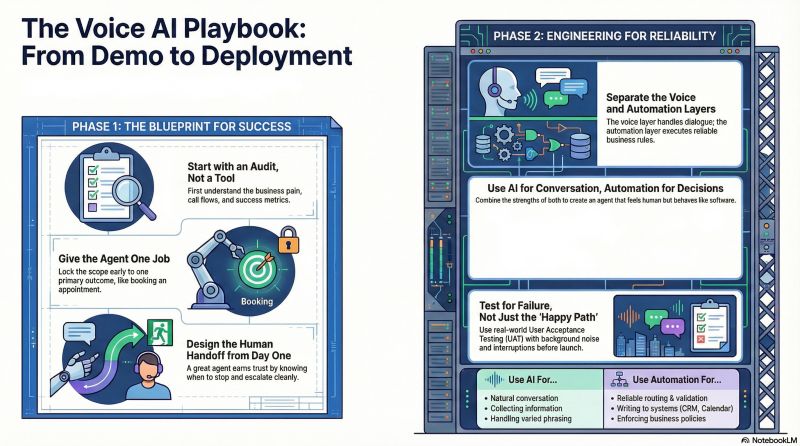
Integrations checklist (STT, TTS, LLM, telephony, transports)
Use this checklist to judge any GitHub repo in 60 seconds.
Speech-to-Text (STT)
- Open-source: Whisper variants
- Hosted: Deepgram, AssemblyAI, Google, Azure
- Key features: streaming partials, diarization (optional), language detection
LLMs
- Hosted: OpenAI, Anthropic, Google, Groq
- Self-hosted: local models (if you accept ops + GPU requirements)
- Key features: streaming output, function/tool calls, JSON mode, tool latency controls
Text-to-Speech (TTS)
- Hosted: ElevenLabs, Cartesia, PlayHT, Resemble
- Open-source/self-hosted: varies (quality and latency differ widely)
- Key features: streaming audio chunks, multiple voices, multilingual
Telephony
- Twilio, Plivo, SIP trunking
- Key features: real-time media streaming, call control webhooks, recording, DTMF events, transfers
Transports
- WebRTC (LiveKit, Daily, others)
- WebSockets (often simpler, sometimes higher latency or less robust under bad networks)
- gRPC (common in backend pipelines)
Business integrations
- Webhooks for your backend
- CRM integrations (HubSpot, Salesforce)
- Ticketing (Zendesk)
- Calendar and payments
- Observability: logs, metrics, tracing, conversation replay
Cost also matters. A practical 2026-style estimate for real-time voice agents is $0.05-$0.10 per minute total, often broken down as:
- STT ~$0.006-$0.02/min
- LLM tokens ~$0.01-$0.05/min
- TTS ~$0.01-$0.04/min
- WebRTC egress ~$0.001-$0.005/min
- These are usage-based estimates aggregated from provider pricing and real deployments, with self-hosting sometimes cutting to <$0.08/min at high call volumes.
Production-ready signals on GitHub (what to check fast)
Stars help, but they do not prove reliability. Check these signals:
- CI/tests: GitHub Actions, test folders, badges
- Releases/tags: versioned releases, changelog
- Recent commits: not abandoned
- Issue response: maintainers reply, issues are triaged
- Security policy: SECURITY.md or guidance
- Contributing guide: CONTRIBUTING.md, code style, PR workflow
- Examples: an examples/ folder matters more than a long README
- Docker support: Dockerfile / compose for repeatable setups
- Clear docs: docs site or structured markdown docs
This is how you avoid weekend demos when you need production.
Glossary (key terms)
- Barge-in handling :The ability for the user to interrupt the agent mid-speech. A good system stops TTS quickly, cancels or redirects the LLM stream, and keeps context clean.
- Voice Activity Detection (VAD) tuning: Adjusting how your system detects speech vs silence. Tuning affects cut-offs, false endpoints, and perceived latency. Too aggressive feels jumpy. Too slow feels laggy.
- Twilio Media Streams (real-time audio streaming): A pattern for streaming call audio in real time to your server and sending audio back. It is not the same as normal webhooks. It changes how you build low-latency STT/TTS for phone calls.
- DTMF fallback flows: "Press 1 for sales" keypad flows used as a reliability and compliance fallback. DTMF is simple, predictable, and useful when voice fails or when you need explicit consent steps.
- WebRTC: A real-time media protocol used for low-latency audio/video with NAT traversal, jitter buffers, and adaptive bitrate. WebRTC is often the difference between "demo works" and "works on bad Wi-Fi".
Top frameworks overview: LiveKit Agents vs Pipecat (and where Dograh fits)
Most teams end up choosing between a code-first framework and a platform that reduces wiring so you can iterate faster.
Comparison table: Pipecat vs LiveKit Agents vs Dograh (best use cases)
A fast way to think about these three:
There is also a meaningful difference in philosophy and cost signals between LiveKit Agents and Pipecat.
A published comparison frames it like this:
- LiveKit Agents: "Unified infrastructure (WebRTC + Agents)", "extremely low latency", "high scalability", and cost often $0.005-$0.01/min for their layer.
- Pipecat: "transport agnostic framework", "high-control orchestration", "low latency but tunable", and cost depends more on your infra choices.
Treat those numbers as directional guidance, not a full bill. Your real cost is still dominated by STT/LLM/TTS usage.
When to use a code-first framework vs a self-hosted platform UI
If you are shipping a real product, speed matters. Debuggability also matters.
Use a UI-driven platform (like Dograh) when:
- You want to go from idea to working call flow in hours
- Your agent needs decision-tree reliability, not only free-form chat
- Non-ML developers must edit flows safely
- You want built-in testing personas and repeatable evaluation
Dograh is built around that reality: drag-and-drop workflows, plain-English editing, multi-agent workflows to reduce hallucinations, and bring-your-own keys to avoid lock-in. The repo currently shows 157 stars and notable developer attention via a "Show HN" post.
Use code-first frameworks (Pipecat/LiveKit Agents/Vocode) when:
- You need custom audio handling and deep control over turn-taking
- You are integrating complex tools, RAG, or enterprise auth
- You need to embed voice into an existing product architecture
- Your team is comfortable operating real-time services
My view after building and testing these stacks: code-first gives the best control, but it also increases surface area. The first real bug is almost always audio framing, endpointing, or cancellation behavior.
Two first-person notes that match what I see in practice:
- "Having total control is really important to us, it's the benefit of OSS / having access to every line of code." (by Reddit User)
- "Retell feels like the fastest way to ship, while LiveKit becomes compelling only if you need deeper control." (by Reddit User)
Even if you disagree with parts of those takes, the pattern holds: speed vs control is the trade.
A practical ranking checklist (the one we actually use)
This is the checklist we use to rank voice-agent GitHub projects:
- Simplicity to get started (time to first conversation)
- UI simplicity (if any UI exists)
- Hardware/GPU requirements (CPU-first is easier)
- Extensibility/integrations (STT/TTS/LLM/telephony/tool calls)
- Quality of real-time outputs (barge-in, turn-taking, streaming TTS)
- Deployability (Docker/K8s readiness, config, secrets)
- License clarity (OSS license, commercial use allowed)
- Docs quality (examples, diagrams, troubleshooting)
- Safety controls (logging, redaction hooks, policy points, human handoff)
This checklist is more predictive than stars alone.
 Prabakaran Murugaiah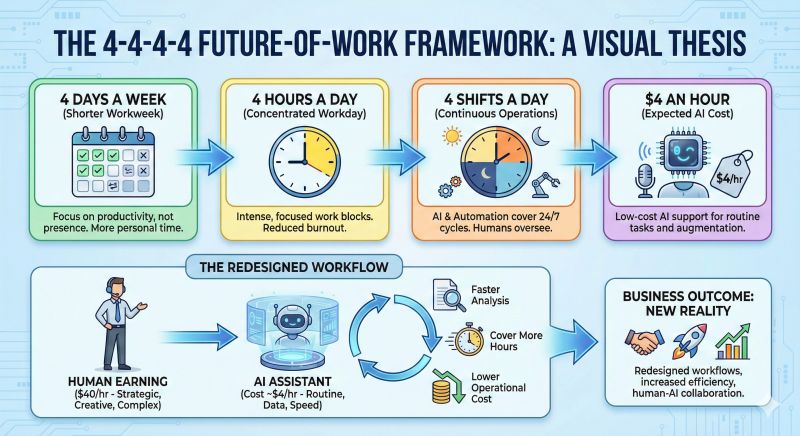
Hands-on GitHub picks: best AI voice agents and frameworks (grouped by use case)
These picks are oriented around "can I ship with it". Stars help you gauge ecosystem gravity, but your final decision should come from fit and maintenance signals.
Category A: Full voice agent platforms (self-hosted, faster to build)
You pick these when you want a working agent fast, plus a UI for iteration.
Dograh - open-source voice agent platform with workflow builder
One-line: A self-hostable, open-source platform to build inbound and outbound voice agents using a drag-and-drop workflow builder and plain-English edits.
- Best for: teams that want to ship fast and still own the code
- Stack: BYO STT/LLM/TTS keys; webhooks for your APIs
- Real-time: yes (designed for conversational voice)
- Telephony: yes (built for calling agents; provider-agnostic approach)
- License: open-source (see repo for current license details)
- Activity/popularity: 157 stars, plus developer interest via "Show HN" (Dograh repo)
- Platform features that matter in practice:
1. Multi-agent workflows (reduces hallucination by routing intent)
2. Built-in testing suite ("Looptalk") to stress test with AI personas (work in progress)
3. Multilingual support and multiple voices
4. Variable extraction from calls and follow-up actions
5. Bring-your-own-keys (no forced vendor lock-in)
3-step quick start
- Clone Dograh AI on GitHub.
- Set environment variables for your STT/LLM/TTS providers.
- Run the app, create a workflow, and place a test call or start a web voice session.
What I like here is the workflow-first approach. In real support and outbound use cases, deterministic routing beats a single prompt.
Category B: Real-time voice frameworks (build your own agent loop)
You pick these when you want code-level control and you can handle more wiring.
Pipecat - real-time voice + multimodal pipeline framework (Python)
One-line: A frame-based Python framework for building real-time voice and multimodal agents with pluggable transports and services.
- Best for: custom orchestration, multimodal inputs, deep control over the pipeline
- Stack: pluggable STT/TTS/LLMs; common choices include Deepgram/ElevenLabs/OpenAI
- Real-time: yes; designed for streaming and interruption management
- Telephony: possible via transport choices and integrations
- Popularity: 10,000+ GitHub stars (Pipecat)
- Why it is strong: pipelines are explicit. You can tune VAD, endpointing, cancellation, and tool calls.
3-step quick start
- Clone Pipecat.
- Create a .env with STT/LLM/TTS keys (per examples).
- Run an example pipeline and speak to it; then swap providers one by one.
When Pipecat feels hard, it is usually because real-time systems are hard. The framework makes the complexity visible, which is good for production.
LiveKit Agents - realtime voice agent framework in the LiveKit ecosystem
One-line: A realtime framework for building voice AI agents with WebRTC-first streaming and turn detection.
- Best for: low-latency web voice, scalable sessions, realtime media handling
- Stack: supports STT + LLM orchestration + TTS pipelines with VAD and turn detection
- Real-time: yes; WebRTC optimization is a major advantage
- Telephony: can be added with bridges; best when your core transport is WebRTC
- Popularity: ~9.2k stars (see the LiveKit GitHub org)
- Notable infra notes: SFU architecture reduces client CPU/bandwidth and handles ugly network conditions.
3-step quick start
- Start from the LiveKit GitHub org and find Agents examples.
- Configure your STT/LLM/TTS provider keys.
- Run a demo agent and connect from a web client.
If you want a guided walkthrough, this video is a decent practical path: Build Your First Voice AI Agent in 20 Minutes with LiveKit.
Vocode Core - programmable voice agents with provider integrations
One-line: A framework/SDK-style codebase to build voice agents with provider switching across STT/TTS/LLMs.
- Best for: calling-agent patterns, fast switching between vendors, inbound/outbound automation
- Stack: integrates with popular STT/TTS and multiple LLM options
- Real-time: yes, with turn-based and streaming abstractions
- Telephony: yes, commonly used for calling flows
- Popularity: ~3.7k GitHub stars (Vocode GitHub org)
3-step quick start
- Open Vocode on GitHub and pick the core repo.
- Set provider keys in env variables.
- Run the minimal agent example, then add telephony transport if needed.
Category C: Telephony and calling agents (Twilio/Plivo/SIP)
Calling agents add constraints that web voice does not have. You need streaming call audio, DTMF, and reliable fallbacks.
Even when your agent logic is solid, the call experience fails if:
- barge-in does not work
- sampling rate is wrong
- you do not handle long silences, hold music, and transfers
- you cannot hand off to a human safely
What features matter for the "best AI outbound calling bot" angle
- Answer detection (human vs voicemail)
- Compliance hooks (consent and recording notices)
- Rate limits and pacing (avoid call bursts and carrier flags)
- CRM handoff (webhooks to create leads, tickets, notes)
- Recording + summaries (with retention controls)
What is answer detection in outbound calling bots?
Answer detection is the logic that decides what picked up your call: a real human, voicemail, or an IVR/menu.
In outbound calling, this matters because you do not want your bot talking to voicemail as if it is a person. It also affects compliance and user trust. The agent may need to change its script, leave a message, or end the call.
In practice, answer detection is a set of signals:
- early audio patterns (beep, greeting length)
- silence windows and timing
- DTMF/menu prompts
When you evaluate repos, check if they expose these hooks cleanly. If the repo hides telephony events behind one callback, you will struggle later.
Recommended approach for telephony repos (practical, repo-agnostic)
Rather than listing dozens of small Twilio demo repos (many are unmaintained), use a framework plus a clear transport.
Good pairings are:
- Dograh (workflow + calling agent UX) + your telephony provider
- Pipecat (custom orchestration) + telephony media streaming
- Vocode (calling patterns) + telephony integration layer
3-step quick start (telephony pattern)
- Pick your transport: Twilio Media Streams, SIP, or a supported bridge.
- Ensure audio is normalized (codec + sampling rate) before STT.
- Implement DTMF fallback and human handoff from day one.
This Reddit thread captures the common split between hosted platforms and open-source frameworks: "What's your current / best AI voice agents stack?".
Starter paths: copy-paste routes to your first real-time voice agent
These are straightforward paths. The goal is to get your first real conversation fast, then harden it.
Starter Path 1: Fastest local demo (talk to a bot in minutes)
Fast feedback matters more than architecture early on.
Recommended path
- Use Dograh if you want a UI and workflow edits fast.
- Use Pipecat if you want a minimal code pipeline and you will tune VAD/endpointing.
Steps
- Clone Dograh or Pipecat.
- Add your provider keys (STT/LLM/TTS) in .env.
- Run the default demo and speak.
- Turn on debug logs for VAD/endpointing decisions.
- Fix the first obvious issue: cut-offs or slow first response.
A simple latency goal for a "feels real" demo is: keep end-to-end below ~600-800ms, and aim for better as you tune buffers and TTFT.
Starter Path 2: Self-hosted production (Docker + env + scaling basics)
Self-hosting is mainly about repeatability, secrets, and visibility.
Steps
- Containerize your agent stack with Docker (or use the repo's Docker support).
- Store secrets properly (dotenv in dev, secret manager in prod).
- Add logs for: audio format, VAD events, STT timing, TTFT, TTS start time.
- Add rate limiting and session limits.
- Store audio and transcripts with retention rules.
Dograh being self-hostable and open source is a real advantage: you can inspect and control everything, and you are not blocked by a vendor's black box.
Also keep cost in mind when scaling. A realistic usage-based estimate for a typical hosted stack is $0.05-$0.25/min all-in, while self-hosting can reduce vendor costs but adds infra cost and ops time.
Starter Path 3: Telephony (Twilio/Plivo) with real-time streaming + barge-in
Telephony is where real-time gets serious.
Steps
- Use a telephony streaming method (for Twilio, this is commonly Media Streams).
- Normalize audio immediately (codec, sampling rate).
- Implement barge-in: stop TTS quickly when user speech resumes.
- Handle DTMF from day one (fallback menus, explicit consent, safe navigation).
- Add human handoff and failure fallbacks.
Common pitfalls:
- buffering too large (kills interactivity)
- wrong sampling rate (STT accuracy drops, audio sounds distorted)
- no cancellation logic (agent talks over the user)
- no retry logic for flaky streaming sessions
If you want to learn the WebRTC-first approach before telephony, start with LiveKit. This video walkthrough is a helpful baseline: Build Your First Voice AI Agent in 20 Minutes with LiveKit.
Vapi vs Open Source Voice Agents: Which to Choose?
Discover Vapi vs Open-Source voice agents like Dograh, Pipecat, LiveKit, and Vocode to decide the best option for cost, control, and scale.
Common failure points in real-time voice systems
Most "it works locally" failures fall into predictable buckets:
- Echo and feedback loops
- Jitter and unstable network conditions
- Wrong sampling rate (audio distortion + STT errors)
- Buffering too large (kills barge-in and responsiveness)
- Token latency spikes (LLM TTFT variability)
- TTS delays (slow first audio makes it feel broken)
- Interruption bugs (agent continues speaking after user starts)
- Tool-call latency (agent pauses during API calls)
- Flaky WebSocket/WebRTC sessions (reconnect logic missing)
Latency targets can be used as a sanity check: STT 50-250ms, TTS 50-150ms to first audio, and aim for <600-800ms end-to-end (Simplismart latency guide).
Compliance and safety basics for calling bots (what to plan for)
Calling bots touch sensitive data. Plan for safety early, even in prototypes.
Key basics:
- Consent prompts (especially if recording)
- Call recording notice and storage retention rules
- PII handling: redact where possible, limit transcript exposure
- Human handoff: transfer to a person when confidence is low
- Auditability: logs and call summaries help, but store responsibly
When you evaluate repos, look for:
- webhook points for compliance prompts
- structured logging
- easy handoff and end-call controls
- configurable retention and export
Final recommendations (practical picks)
If you want a single starting point that is open source and fast to ship, start with Dograh. It is built for rapid voice workflows, self-hosting, and bring-your-own-keys. I would pick it when you want reliable call flows and fast iteration without rebuilding the whole stack from scratch.
If you want deep code control, choose:
- Pipecat for pipeline clarity and orchestration control (10k+ stars).
- LiveKit (Agents) for WebRTC-first, low-latency realtime architecture (~9.2k stars).
- Vocode when you want calling patterns and provider flexibility (~3.7k stars).
Related Blog
- Discover the Self-Hosted Voice Agents vs Vapi : Real Cost Analysis
- A Practical Cost Comparison Self-Hosted Voice Agents vs Bland: Real Cost Analysis (100k+ Minute TCO)
- A Practical Cost Comparison Self-Hosted Voice Agents vs Retell: Real Cost Analysis (TCO Tables + $/Min).
- Explore Voice AI for Law Firms: Why We Chose Quality Over Latency By Alejo Pijuan (Co-Founder & CEO @ Amplify Voice AI, AI Ethics Thought Leader, Expert Data Scientist, Previously senior data scientist at Nike.)
- See how 24/7 Virtual Receptionist Helps Small Firms Win More Clients by boosting responsiveness and improving customer engagement.
- Learn how From Copilots to Autopilots The Quiet Shift Toward AI Co-Workers By Prabakaran Murugaiah (Building AI Coworkers for Entreprises, Government and regulated industries.)
- Check out "An Year of Building Agents: My Workflow, AI Limits, Gaps In Voice AI and Self hosting" By Stephanie Hiewobea-Nyarko (AI Product Manager (Telus AI Factory), AI Coach, Educator and AI Consultancy)
FAQ's
1. Name ai voice assistant github ?
If you’re looking for an AI voice assistant GitHub project that supports real-time conversations, Dograh AI is a solid option. It’s a fully open-source, self-hosted platform for building real-time voice agents quickly, with a clean UI and a drag-and-drop workflow builder.
2. How to test voice AI agent?
A practical way to test a real-time voice agent is to simulate many realistic conversations and see where it fails—barge-ins, edge cases, silence, noise, and API errors. In Dograh AI, LoopTalk runs AI-to-AI stress tests with different caller personas to quickly expose weak prompts, broken flows, and missed handoffs critical for reliable AI calling and AI cold-calling bots.
3. Name ai voice agent open source ?
If you want open-source AI voice agents, top GitHub options include Dograh AI (full self-hostable platform), LiveKit Agents (WebRTC-first real-time audio), Pipecat (deeply customizable agent pipelines), and Vocode (telephony-focused calling flows).
4. How do I choose the best AI voice agent GitHub repo for a real-time calling bot ?
To choose the right AI voice agents GitHub project, check for true end-to-end streaming (barge-in, low-latency TTS), fast demo setup, and clear production signals. Then match the tool to your goal: Dograh for platform speed, LiveKit Agents for WebRTC streaming, or Pipecat for deep pipeline control.
5. What is a real-time voice agent stack (STT, LLM, TTS), and why does streaming matter ?
A real-time voice agent stack has three parts STT, LLM, and TTS and the key difference between a demo and a product is streaming, which enables low latency, barge-in, and natural turn-taking.
6. Are there open-source AI voice agents for specific use cases like medical intake or recruiter screening ?
An AI medical voice agent GitHub project needs structured intake, safe prompts, and clear escalation, while an AI recruiter voice agent GitHub focuses on branching questions, resume context, and consistent scoring. The fastest path is using an open-source platform like Dograh to design workflows and plug in your own STT/LLM/TTS.
Was this article helpful?
