
AI voice agents are quickly becoming the "new front desk" for clinics and hospitals. They answer calls, book visits, collect patient details, and escalate urgent cases to doctors . If your phones are busy, your hold times are high, and staff are burned out, this guide is for you.
Table of Contents
- Best AI Voice Agents for Healthcare + How to Build One (Dograh)
- Myths (that slow teams down)
- What an AI Voice Agent for Healthcare Is (and How It Works)
- Use Cases and ROI by Patient Journey (Real Pilot Lessons)
- Selection Checklist: What to Look for in a Healthcare Voice Assistant
- Open Source Options for Healthcare (Self-Host, Data Residency, GitHub)
- Step-by-Step: Build a HIPAA-Ready AI Voice Agent with Dograh AI
- FAQ
Best AI Voice Agents for Healthcare (Dograh AI )
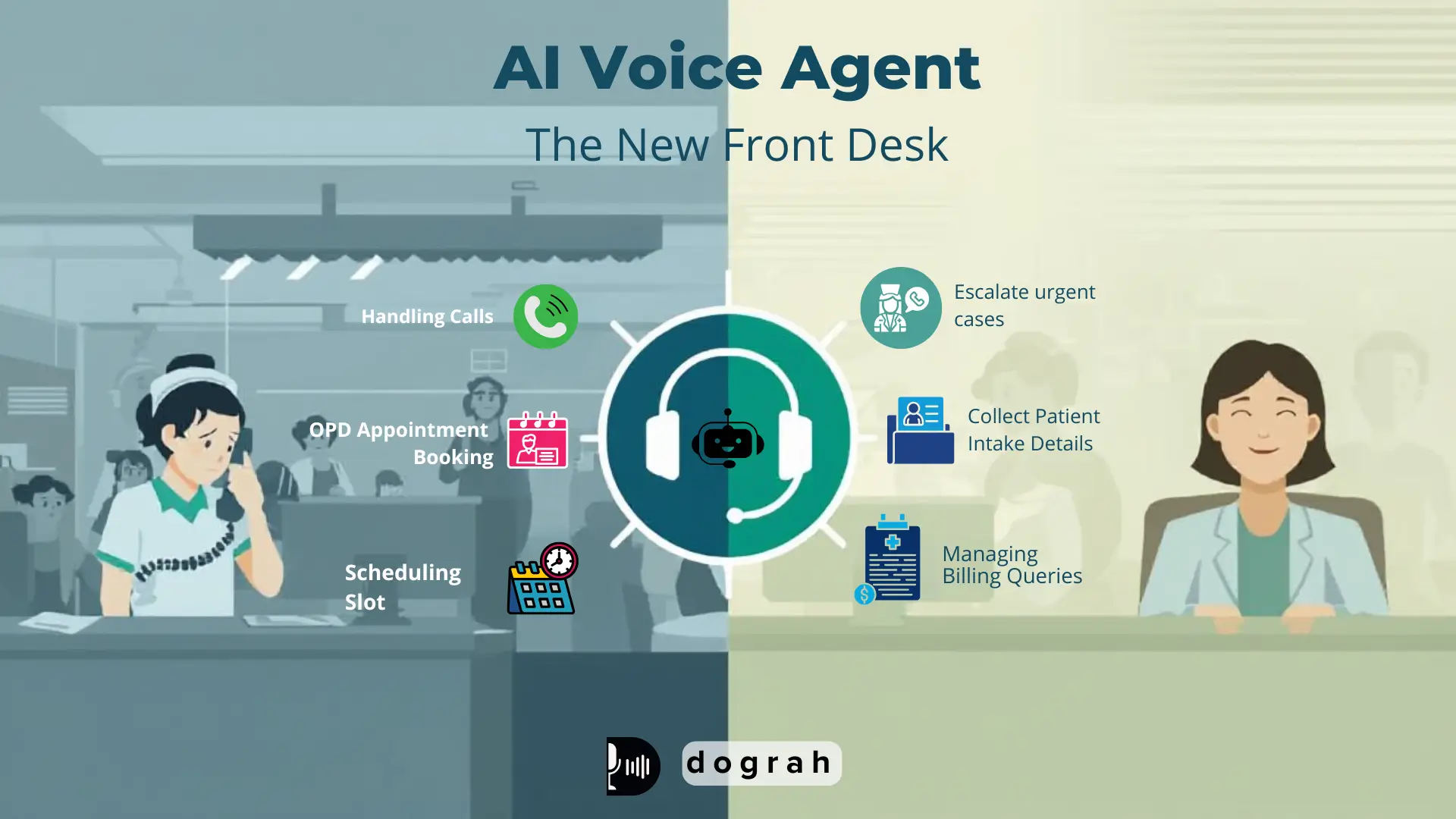
AI voice agents help healthcare teams handle real phone calls/patient queries at scale. This post shows how to evaluate options, then build a HIPAA-ready agent using Dograh AI.
Who this guide is for ?
If you run operations, IT, patient access, or a digital team, you already know the problem. Phones never stop, staffing is hard, and patients hate waiting.
This guide is for:
- Clinics that need appointment booking, reminders, and FAQ coverage
- Hospitals and health systems that need governance, audit logs, integrations, and escalation rules
- Systems that need member outreach, benefits answers, and prior auth-style call flows
From my own work, voice agents are starting to look like chatbots did five years ago: early, imperfect, but already useful for 24/7 coverage and repetitive tasks. I am generally bullish on voice for access and intake, but only when it is built with strict guardrails and a clear escalation path.
What an AI voice agent in healthcare does ?
An AI voice agent in healthcare is a phone-based AI assistant that talks and listens like a human. It can answer questions, capture patient details, and take actions like booking an appointment.
It is different from:
- A chatbot: chat is text-first; voice agents run on real calls
- An IVR: IVR is "press 1, press 2"; voice agents handle natural speech and intent
What this post covers ?
You will get:
- A clear "what it is" and how it works
- Healthcare use cases across the patient journey
- A selection checklist for HIPAA and safety
- A tool roundup with compliance notes
- Open source options and self-host guidance
- A step-by-step build using Dograh AI
- Testing, monitoring, and rollout plan

What an AI Voice Agent for Healthcare Is
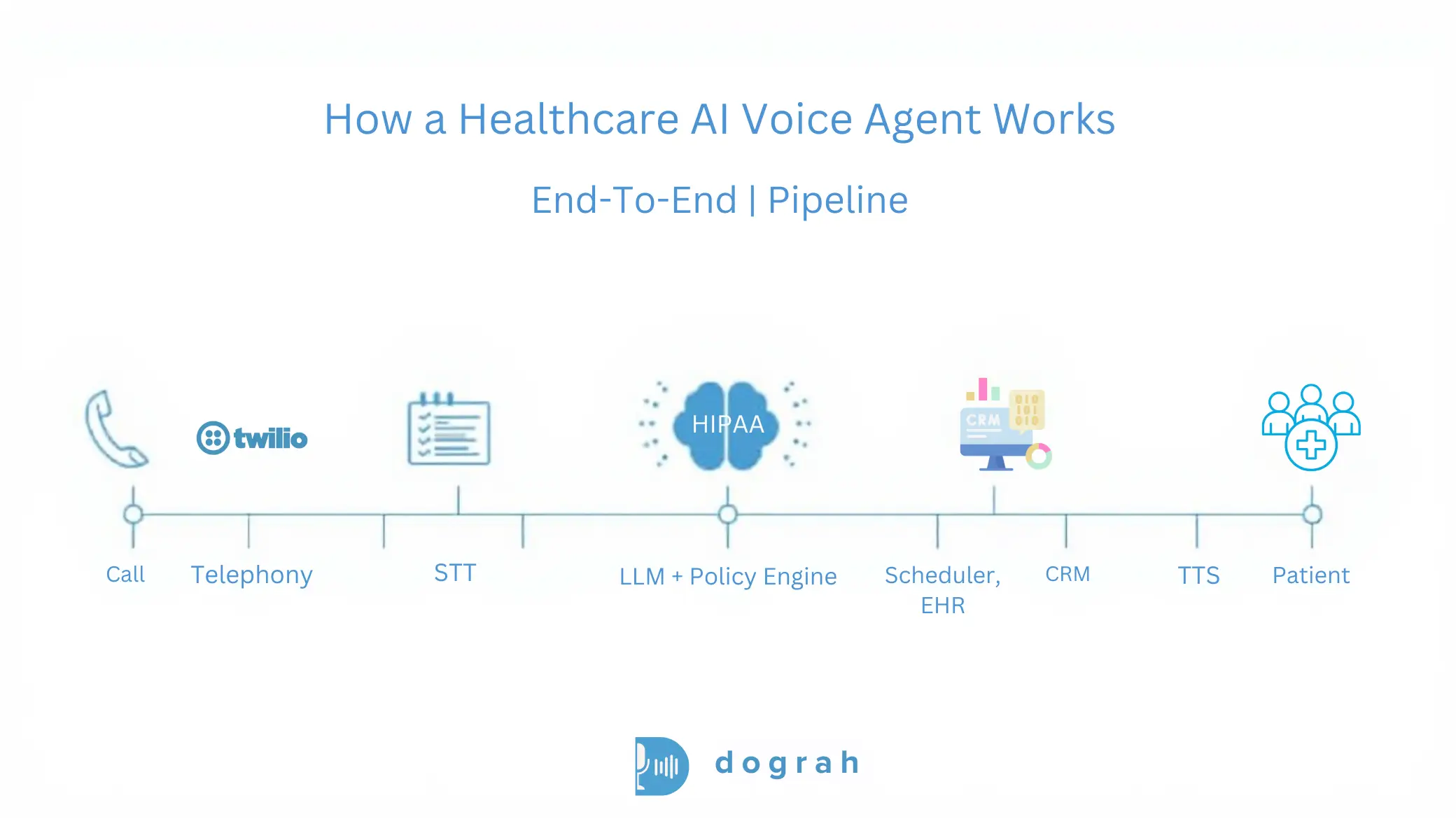
A healthcare voice agent is a system, not a single model. It is a pipeline that moves speech into actions, with safety and compliance controls around it.
How it works in simple steps ?
Think of it as a loop:
- Telephony receives the call The system answers an inbound number or places an outbound call.
- STT (speech-to-text) Patient speech becomes text for processing.
- LLM reasoning and policy The AI decides what to do next using rules, intent detection, and workflow logic.
- Tool calls (EHR/CRM/scheduler/billing) The agent calls APIs or webhooks to fetch or update real systems.
- TTS (text-to-speech) The agent speaks back to the patient in a natural voice.
- Logging and analytics You store transcripts, metadata, and outcomes based on retention rules.
Where AI fits in hospitals and clinics ?
Most value shows up in workflows that are frequent and predictable. That usually starts at the front door.
Common fit areas:
- Front desk: new patient calls, hours, directions, insurance accepted
- Scheduling: book, reschedule, cancel, waitlist
- Patient intake: capture reason-for-visit and symptom details
- Billing: balance questions, payment links, claim status routing
- Follow-ups: lab reminders, post-discharge check-ins
- Internal ops: routing calls to teams, creating tickets, updating CRM fields
Benefits that show up fast
You usually see benefits quickly when calls are high-volume. Healthcare call centers often miss targets.
Example benchmarks from healthcare call center data:
- Average hold time (ASA): 4.4 minutes actual vs <50 seconds target (HFMA target)
- Abandonment rate: 7% average vs <5% target (CMS/VHA)
- Daily call volume: ~2,000 calls, and monthly inbound volume: 55-60k calls
Practical benefits:
- 24/7 answering without adding shifts
- Fewer abandoned calls and missed bookings
- Deflection of repetitive questions
- Less staff burnout from repetitive scripts
- Consistent capture of intake details and consent steps
Dograh AI supports inbound and outbound calling, call transfers, SIP connectivity, and a knowledge base with RAG so the agent can securely use your company data.
Glossary (key terms)
- Warm transfer with transcript summary: A handoff where the call is transferred to a human and the agent passes a short structured summary (and key fields) so staff do not restart the conversation.
- Shared responsibility model (HIPAA-ready open source): Open source software can be deployed securely, but you still own many compliance duties (hosting security, access controls, retention, incident response, vendor BAAs).
- Custom keyword dictionary (healthcare terminology tuning): A curated list of clinic-specific terms (drug names, clinician names, department acronyms) used to improve recognition and reduce errors in STT/LLM behavior.
- BYO STT/LLM/TTS (bring-your-own speech and model providers): You choose which speech-to-text, language model, and text-to-speech vendors to use. This helps control cost, privacy, and data residency.
- Data residency: A requirement that data is stored and processed in specific regions (country/state/zone), often driven by regulation and contract terms.
Use Cases and ROI by Patient Journey
The best healthcare voice projects start with one workflow. Then they expand once quality and safety are proven.
Inbound: AI receptionist
An AI receptionist is often the fastest win. It handles the front desk phone without long holds.
Common tasks:
- Book, reschedule, cancel appointments
- Answer FAQs (hours, location, prep instructions)
- Route to the right team (billing, referrals, nurse line)
- Collect basic details before handoff
Why it matters: the phone problem is measurable. If your hold time is minutes, you lose patients and staff time.
The call center benchmarks show a gap: 4.4 minutes average hold time vs <50 seconds target and 7% abandonment vs <5% target. Voice agents do not fix staffing, but they can absorb repetitive calls that create the queue.
Pre-visit intake: symptom capture and reason-for-visit
Pre-visit intake is one of the highest ROI use cases I have seen. It can replace forms, reduce nurse time, and improve schedule readiness.
What it does:
- Confirms identity and contact details
- Captures reason for visit in structured fields
- Collects symptoms, duration, basic history prompts
- Flags urgent intent for immediate escalation
- Writes a clean summary into your system (or sends to staff)
From real pilots and deployments, hospitals often see 5x-10x ROI on pre-visit intake depending on volume. The savings come from staff time and fewer incomplete visits.
Do not let the agent diagnose. Use it to capture and route safely.
There is also growing evidence that well-evaluated generative voice systems can be safe at scale. A large safety evaluation with over 307,000 simulated patient interactions, each reviewed by licensed clinicians, reported medical advice accuracy exceeding 99%, with no instances of potentially severe harm in that evaluation.
That does not remove your responsibility. It does support the case for careful design, testing, and escalation policies.
Outbound: reminders, meds, lab follow-ups, no-show reduction
Outbound calling is straightforward to automate and easy to measure. It can improve equity when done in the patient's preferred language.
Common outbound flows:
- Appointment reminders and confirmations
- Medication reminders (non-emergency adherence support)
- Lab follow-up nudges ("your lab is ready, please check portal / call back")
- Post-discharge check-ins (symptom screen -> escalate if urgent)
- Preventive care outreach
One practical example from field experience: an AI agent conducted personalized, language-concordant outreach and saw more than double the FIT test opt-in rate among Spanish-speaking patients (18.2% vs 7.1%), with longer call durations (6.05 vs 4.03 minutes). That suggests voice agents can reduce disparities when designed and monitored well.
Emerging use of voice in wearables for patient vitals and trends
Wearables plus voice is an emerging pattern. Patients ask "what changed" instead of reading charts.
A safe version of this:
- "What was my resting heart rate trend this week?"
- "Did my sleep improve compared to last week?"
- "What should I do next?" (non-emergency guidance + disclaimers)
Guardrail: for urgent symptoms, the agent should escalate. It should not replace clinical triage.
Research on voice-controlled intelligent personal assistants (VIPAs) also predicts broad use in remote anamnesis and patient interactions, while noting patients still prefer humans for psychological support.
Selection Checklist for Choosing a Healthcare Voice Assistant
Choosing a vendor is mostly about risk control. Features matter but safety, governance, and integrations decide success.
Compliance basics including HIPAA, BAA, and SOC 2 and what they really mean
HIPAA discussions get confusing fast. Here is a direct evaluation approach.
Check:
- HIPAA alignment: Does the vendor commit to HIPAA support in writing, with clear boundaries?
- BAA (Business Associate Agreement): Will they sign it, and for which components?
- SOC 2 / ISO 27001: Not a HIPAA requirement, but a useful signal for security controls and auditability
Clinics vs health systems:
- Small clinics often need speed and a reasonable BAA scope.
- Health systems usually need deeper governance: audit logs, access reviews, retention controls, and sometimes on-prem deployment.
PHI handling and safety: redaction, audit logs, retention, access control
Assume PHI will appear in calls. Design as if every transcript could be audited.
Checklist:
- Role-based access control (RBAC) for transcripts and recordings
- Encryption in transit and at rest
- Configurable retention windows (audio and text separately)
- Consent capture language (recording and data use)
- Redaction/masking for sensitive fields (DOB, SSN, member IDs)
- Audit logs for: logins, exports, prompt edits, workflow edits
- Least-privilege access to EHR and scheduling APIs
- Separate environments for dev/test/prod
Human handoff for urgent cases
Every healthcare voice agent needs an escalation design. This is non-negotiable.
A safe handoff pattern:
- Detect emergency or urgent intent (chest pain, stroke signs, suicidal ideation, severe shortness of breath)
- Use a policy-based response: If emergency intent is detected: instruct to call local emergency services (or transfer to nurse line if policy allows)
- Perform a warm transfer with transcript summary: Transfer the call to staff. Provide a short structured summary: reason, symptoms, duration, risk flags, patient identifiers captured
Key integrations for EHR, CRM, scheduling, prior authorization, and payments
Most projects fail because they are voice-only. Real ROI needs actions.
Look for:
- Webhooks and API support for custom actions
- Scheduling integrations (clinic calendar, practice management systems)
- CRM/ticketing to create tasks for staff
- Eligibility/benefits tools if you run payer-style workflows
- Payment links for billing calls (careful with PCI scope)
- Ability to run in your network or meet data residency needs
A helpful real-world reference is the ongoing community discussion on integration needs and analytics expectations, like "AI handled 47 calls today, booked 23 appointments."
Open Source Options for Healthcare with Self-Hosting, Data Residency and GitHub
Open source helps when you need control. But open source does not mean compliant by default.
Why open source helps compliance ?
Healthcare compliance is mostly about limiting exposure and proving control. Self-hosting can reduce the number of external systems that touch PHI.
From my experience, this is the biggest practical reason open source wins in healthcare:
- Fewer third-party hops
- Lower multi-tenant risk
- Better support for data residency
- Often lower latency when co-located with your systems
This matches common guidance: open source can run on-prem or in your own servers, reducing leakage risk and supporting residency requirements.
If you want a starting point repo to study common patterns, this is a useful reference: Healthcare AI Voice Agent (GitHub workflow example). Use it for architecture ideas, not as a finished compliant product.
What "HIPAA-ready" means for open source ?
HIPAA-ready means you can build a compliant system with the right controls. It does not mean the software alone makes you compliant.
Shared responsibility checklist:
- Secure hosting (networking, patching, secrets management)
- RBAC and access reviews
- Audit logging and export controls
- Data retention rules for audio and transcripts
- Incident response plan and breach workflows
- BAAs for any vendors that touch PHI (telephony, STT, TTS, hosting, logging)
Step-by-Step Guide to Building a HIPAA-Ready AI Voice Agent with Dograh AI
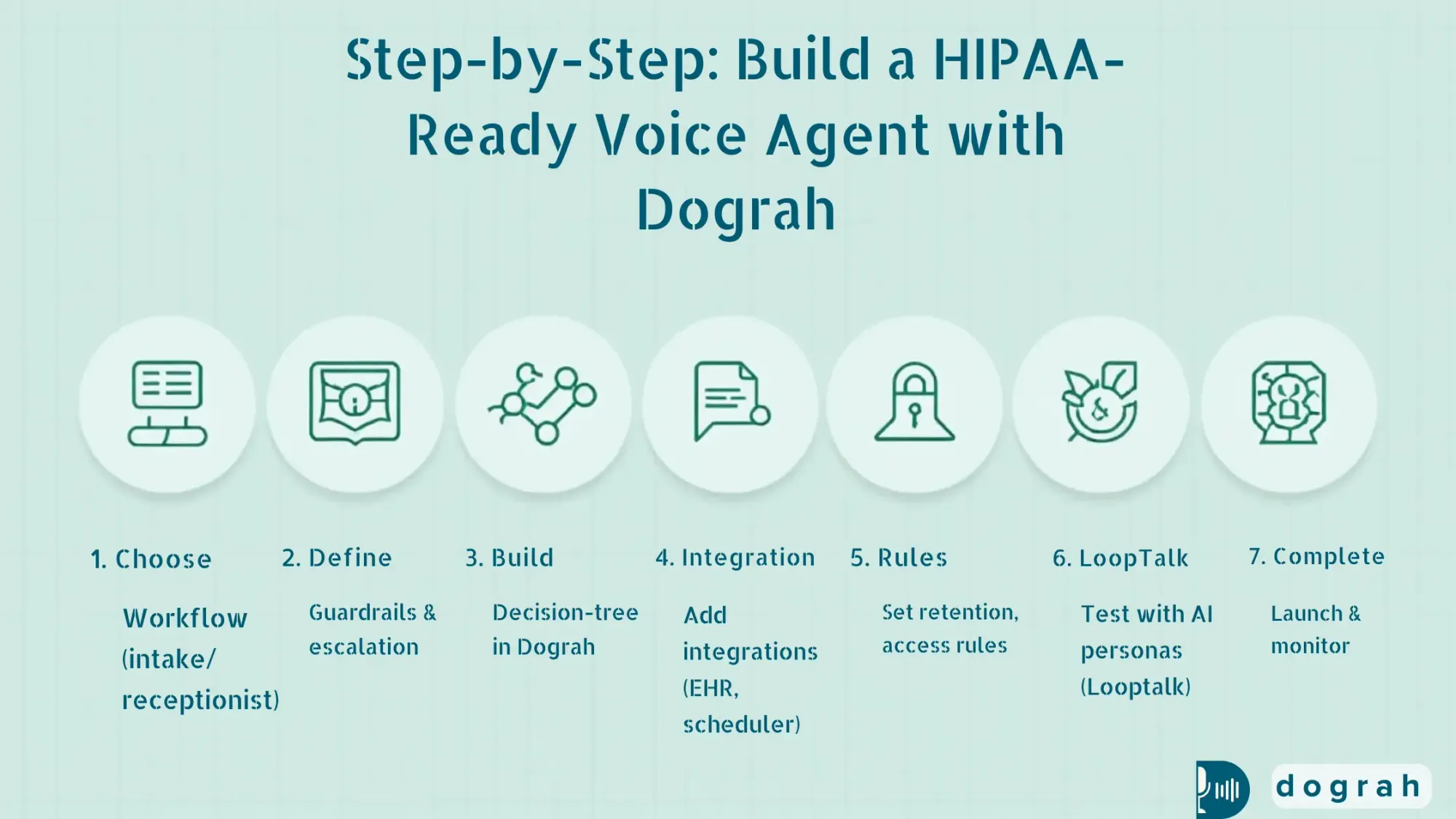
This is the practical build section. We will focus on a safe, high-ROI workflow and a HIPAA-ready architecture pattern.
Architecture Blueprint for Telephony, STT, LLM, TTS, Tools and Storage
A simple reference architecture looks like this:
- Telephony provider (inbound/outbound calling)
- STT provider (speech-to-text)
- LLM provider (reasoning + workflow)
- TTS provider (voice output)
- Dograh AI workflow layer (orchestrates the conversation)
- Tools layer (webhooks/APIs to scheduler/EHR/CRM)
- Storage (transcripts, call metadata) with retention rules
- Analytics and monitoring
Dograh AI is built for the orchestration layer:
- Drag-and-drop workflow builder
- Build flows in plain English
- Multi-agent workflow paths (decision-tree style to reduce hallucinations)
- BYO STT/LLM/TTS keys
- Webhooks to call your APIs
- Variable extraction from calls for follow-up actions
- Self-hostable, open source, with a managed cloud option
You can start on the hosted builder here: Dograh AI cloud app.
HIPAA-ready design choice: self-host Dograh and co-locate storage. This is the direction I recommend when PHI risk is high or residency rules are strict.
Step 1: Define the workflow (receptionist or pre-visit intake)
Pick one workflow that is high-volume and predictable. For many teams, that is receptionist or intake.
Example: Pre-visit intake (recommended for ROI)
Define:
- Entry conditions: "new patient", "existing patient", "post-discharge", etc.
- Required fields:
1. Full name
2. DOB (or alternate verification)
3. Callback number
4. Reason for visit (structured categories + free-text)
5. Symptoms + duration (structured prompts)
6. Consent to proceed and recording notice (per policy)
- Stop conditions:
1. Emergency intent triggers escalation
2. Patient requests a human
3. Verification fails after 2 tries
Short script outline:
- Greeting + disclosure
- Identity verification
- Reason for visit
- Symptom capture (non-diagnostic)
- Confirm summary
- Next step: schedule or route to staff
Guardrails to add early:
- The agent does not provide diagnosis
- The agent avoids collecting extra PHI beyond minimum necessary
- Clear emergency language and escalation path
Step 2: Build in Dograh (drag-drop + plain English + multi-agent paths)
Build the workflow as decision nodes instead of one long prompt. This reduces hallucinations and keeps behavior predictable.
In Dograh, a practical build pattern:
- Node 1: Greeting + consent
- Node 2: Verification (name + DOB) If mismatch > retry > then route to staff
- Node 3: Intent detection schedule / intake / billing / urgent / other
- Node 4: Intake collection Ask structured questions, store variables
- Node 5: Tool call via webhook Create an intake ticket, or write to your system
- Node 6: Confirmation + next step
- Node 7: Handoff Warm transfer with transcript summary
Dograh strengths that matter in healthcare:
- You can build in plain English, but still keep strict branching
- Multi-agent workflow paths act like a decision tree
- You can extract variables like:
patient_name, dob, reason_for_visit, symptoms, duration, risk_flag
- Webhooks let you:
1. Create a task in your ticketing system
2. Push structured intake into your CRM
3. Call a scheduling API
Step 3: Add knowledge + context (RAG for patient history when allowed)
Use context only when it is permitted and necessary. This is where teams often over-collect.
A safe approach:
- Store a small call history summary per patient ID
- Keep PHI minimal
- Use strict access control so only the right workflows can retrieve it
- Log every retrieval in audit logs
This matches a practical rule: retrieval should help with continuity, not turn the agent into a chart reader. Dograh supports adding dictionary of business-specific keywords so transcription keeps the intended terms (for example, "BP high" stays "BP high" instead of being rewritten).

Vapi vs Open Source Voice Agents: Which to Choose?
Discover Vapi vs Open-Source voice agents like Dograh, Pipecat, LiveKit, and Vocode to decide the best option for cost, control, and scale.
RAG for Patient History with Minimum-Necessary Context Retrieval
RAG (Retrieval-Augmented Generation) is a pattern where the agent retrieves small pieces of approved information from a knowledge store. Then it uses that information to respond, instead of guessing.
For healthcare, the key is minimum necessary retrieval. Do not load the full chart. Pull only what the workflow needs, like prior appointment instructions or a last call summary.
A practical RAG setup for patient history:
- A controlled data store (your database or approved document store)
- A retrieval layer that checks identity and permissions
- A short context window passed to the agent
- Audit logs that record which data was retrieved, when, and why
This directly addresses a common failure mode: losing patient context. It also reduces PHI exposure by limiting what is retrieved. Dograh AI lets the bot access your company data and knowledge base using RAG for accurate, context-aware responses.
Security, Privacy, and Safety Controls for Healthcare Must-Haves
Security is the product in healthcare. Your voice agent is only as safe as its PHI flow and operational controls.
PHI Flow Map Showing Where PHI Appears and How to Limit It
Start by mapping PHI exposure points. This makes the rest of the compliance decisions clear.
PHI can appear in:
- Audio recordings (raw voice)
- Transcripts (text)
- Tool calls (EHR writes, scheduling requests)
- Logs (debug logs, error logs)
- Analytics dashboards (exports, summaries)
How to limit exposure:
- Avoid recording audio unless required
- If recording is needed, separate storage and apply strict retention
- Redact sensitive fields in transcripts
- Use least-privilege API keys for tool calls
- Do not log raw payloads in production
- Prefer self-host or controlled hosting for core components
Top failure modes and safeguards
Failure modes show up repeatedly across deployments. Plan for them before launch.
Top failure modes (seen in practice):
- PII/PHI leakage
- Weak healthcare terminology understanding
- Losing patient context
Safeguards that work:
- Masking/redaction in transcripts and logs
- Self-hosting to reduce third-party hops
- A custom keyword dictionary for clinic terminology (drug names, doctor names)
- Healthcare-tuned models when possible
- RAG-based context retrieval with strict access controls
Data Retention and Residency Rules by Region
Residency matters because healthcare rules differ widely by region and domain. Even within one country, contracts may require specific storage locations.
Practical approach:
- Store only what you need for operations and quality
- Set short retention for raw audio unless required
- Keep transcripts longer only if needed for audit and improvement
- Co-locate storage with your environment when possible
Self-hosting helps because you control where data lives. It also reduces exposure from multi-tenant environments.
Operational Controls for Audit Logs, Access Reviews and Pre-Launch Testing
Operational controls are how you prove compliance over time. Set them up before you connect real patients.
Minimum operational controls:
- Audit logs for workflow edits and prompt edits
- RBAC for who can access transcripts and recordings
- Monthly access reviews for staff and vendors
- Pre-launch test plan with edge cases
- Ongoing monitoring of escalation failures
Dograh's practical angle: iterate fast, but treat production like clinical infrastructure. No shortcuts.
Testing, Monitoring and Improving Call Quality Before and After Launch
Testing is how you avoid patient harm and bad experiences. You need both scripted tests and stress tests.
Test Scripts for Healthcare Covering Edge Cases and Urgent Intents
Build a repeatable test suite. Run it every time you change prompts or workflows.
Healthcare test checklist:
- Misheard names (similar last names)
- DOB verification failures and retries
- Accents and multilingual callers
- Noisy environment calls
- Patient refuses recording consent
- Caller asks for medical diagnosis (agent must refuse safely)
- Emergency symptoms:
1. chest pain, stroke signs, suicidal ideation, severe bleeding
- Pediatric scenarios (if applicable)
- Wrong department routing
- EHR/scheduler downtime (fallback behavior)
AI-to-AI testing with Looptalk
Dograh includes an early-stage AI-to-AI testing suite called Looptalk. It lets simulated callers stress test your agent with different personas.
A practical use:
- Persona: "angry patient"
- Persona: "elderly caller with hearing issues"
- Persona: "Spanish-speaking caller"
- Persona: "very short answers"
- Persona: "talks too much"
- Persona: "urgent symptom hints"
This helps you find failure points before real patients hit them. It also supports faster iteration while keeping safety rules stable.
Metrics to track
Pick metrics that show operational value and safety. Track them weekly and by call type.
Core KPIs:
- Containment/deflection rate (calls fully handled by AI)
- Average handle time (AHT)
- Transfer rate to humans (overall and by intent)
- Task completion rate (booked, confirmed, intake captured)
- Drop-off rate (hang-ups mid-flow)
- Urgent escalation detection rate (false positives and false negatives)
- Patient satisfaction signals (if you collect them)
Retell AI vs Open-Source Voice Agent Platforms: Which to choose ?
Compare Retell AI with Open-Source voice platforms like Dograh, Pipecat, LiveKit, and Vocode on cost, control, and scalability.
Closing note
Healthcare voice agents work best when they are treated as operational systems with safety rules. Start with one workflow, measure outcomes, and expand carefully.
If you want to build and self-host a HIPAA-ready workflow with BYO STT/LLM/TTS and fast iteration, start here: Dograh AI cloud app to prototype quickly or reachout to us on Email.
Related Blog
- Discover the Self-Hosted Voice Agents vs Vapi : Real Cost Analysis
- Explore How to Access Claude Without Phone Number: Working Method 2025
- Decison guide to choose Vapi open source alternative in 2025
- Explore Retell ai alterantive among 13 ai voice agent competitors
- Check out Vapi pricing Breakdown in 2025: Plans, Hidden Costs & What to Expect
- Learn how From Copilots to Autopilots The Quiet Shift Toward AI Co-Workers By Prabakaran Murugaiah (Building AI Coworkers for Entreprises, Government and regulated industries.)
- Check out "An Year of Building Agents: My Workflow, AI Limits, Gaps In Voice AI and Self hosting" By Stephanie Hiewobea-Nyarko (AI Product Manager (Telus AI Factory), AI Coach, Educator and AI Consultancy)
FAQ's
1. How can AI be used in healthcare without risking patient privacy?
You reduce risk by keeping PHI exposure small and data paths tight: self-host key systems, collect only what’s needed, redact logs, enforce RBAC with audits, and require BAAs for any vendor handling PHI.
2. How is AI helping healthcare teams today (real examples)?
High-impact uses include booking and rescheduling appointments, handling front-desk questions, collecting pre-visit details, sending reminders, following up on labs or preventive care, and routing billing questions or payments (with tight scope).
3. Are HIPAA compliant virtual assistants possible with open source?
Yes. HIPAA-compliant virtual assistants are possible with open source if you control hosting, limit PHI exposure, secure access and logs, and sign BAAs for any third-party services involved.
4. What are the top 3 voice assistants?
There isn’t a single “top 3,” but leading open source voice assistant platforms include Dograh AI, LiveKit, Pipecat, and Vocode, each commonly used to build production voice agents.
5. What healthcare workflows deliver the best ROI with AI voice agents?
The best ROI comes from high-volume, repeat calls where speed matters. Pre-visit intake stands out by collecting visit details and symptoms , and passing them to staff in a clean, structured way, saving time over manual calls or forms.
Was this article helpful?
